Need to interrogate a PDF without manually copy-pasting its contents into chat? The ChatPDF API turns a document into a queryable source: register a PDF, keep its returned source ID, and send questions against it programmatically. section 5.2
A basic curl workflow has two POST requests:
- Authenticate with an API key and submit the URL of the PDF to the source endpoint. section 5.2
- Send a user message with the returned sourceId to the chat-message endpoint. section 5.2
- Put repeated prompts in a shell loop when one PDF must generate topic-specific assessment questions. section 5.2
Figure 5.2 The request/response process using the ChatPDF API
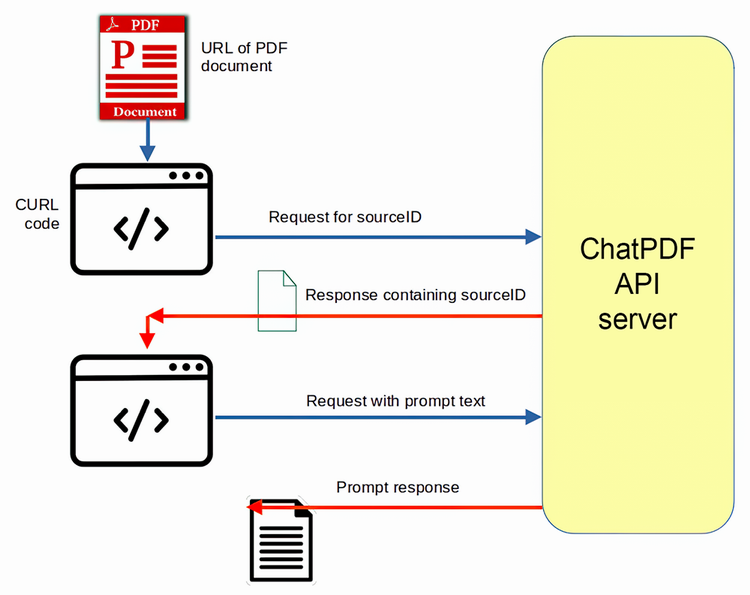
The request/response diagram makes the handoff clear: add a document first, then query the resulting source in a separate request. section 5.2
Mining a long filing
A Form 10-K can run beyond 100,000 words, making it awkward as a normal chat prompt. Convert or obtain it as a PDF, query key investor items, then ask follow-ups about risks or ratios. Treat generated investment analysis cautiously: ratios can change and should be considered alongside other financial metrics. section 7.1
The same PDF-querying task can begin in the browser by dragging in a document, then graduate to scripts when repeatable prompts or integration are worth the extra plumbing. ChatPDF is useful for assessing and querying private PDF documents, not for magically making weak source material stronger. section 5.2 section 5.5
