liveBook · Manning

Code analysis

As explained in Think Like a CTO

Code analysis is the automated examination of source code for quality, correctness, compliance, or security issues.

Code analysis automatically examines source code for quality issues as a gate in a CI/CD pipeline, before compilation, testing, and deployment. section 9.5

A practical pipeline typically proceeds through these gates:

  • A successful commit or merged pull request triggers the pipeline. section 9.5
  • Automated analysis checks source-code quality, commonly with a tool such as SonarQube. section 9.5
  • The pipeline then compiles and builds the code, runs unit and security tests, and deploys only after required gates succeed. section 9.5

A failed quality gate

A developer merges code into the develop branch. Code analysis runs automatically; a failure is flagged for resolution before the build can proceed, preventing an unchecked change from reaching a server environment. section 9.5
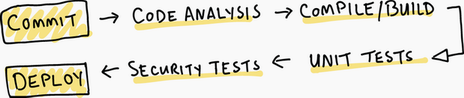
Figure 9.2 Typical CI/CD pipeline

Trace code analysis through the typical CI/CD pipeline and its successive gates. section 9.5
How Think Like a CTO covers it

How deep it goes
Explains placement and purpose in a pipeline but stops short of analyzing specific rules or findings.
Examples
Uses SonarQube, a develop-branch merge, and a failed pipeline gate as concrete examples.
What it assumes
Assumes a repository with branches and commits; introduces the analysis gate within the wider build-and-deploy process.
What you can do after
Apply it via a CI/CD pipeline to flag quality problems before compilation, testing, or deployment.
How it connects
Connects code analysis with continuous integration, builds, unit testing, security testing, and deployment.

Also explained in

Compare how 5 books explain code analysis →

Related concepts

This explainer was generated by Manning's knowledge graph from the text of Think Like a CTO. The section links point to the parts of the book it draws on.