A color picker lets you select and adjust a color using different representations, such as hex or HSB. It is especially useful when a palette looks uneven after being applied to a visualization. section 4.3.3
Use a color picker to refine a palette without changing its overall character:
- Dial down saturation when a color attracts attention it should not receive. section 4.3.3
- Increase lightness or saturation when a color is too dark, muddy, or difficult to distinguish. section 4.3.3
- Check neighboring colors for sufficient separation, including for viewers with color blindness. section 4.3.3
Taming a sunset palette
A sunset-derived palette had an overly vivid yellow, an almost-black bar, and a tan too close to yellow. Lowering the yellow’s saturation helped; opening the color picker in Figma revealed that the dark color was actually desaturated magenta, which could then be adjusted deliberately. section 4.3.3
Figure 4.31 Starting from the color palette on the left, the one generated from my sunset photo, I made a few simple tweaks to saturation and lightness (brightness) and no change to hues, and ended up with the palette on the right.
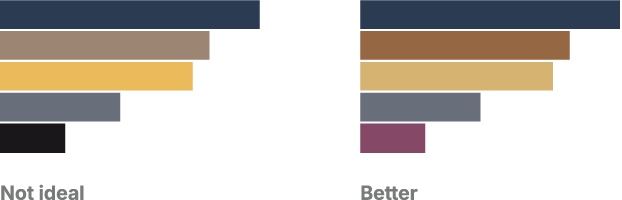
Compare a palette before and after small saturation and lightness changes. section 4.3.3



