When translating a design mockup into CSS, choosing a color notation affects how easily you can adjust colors and which colors you can express. A gamut is the range of available colors; a color space is an arrangement of colors within a gamut. The same gamut can be arranged in more than one way. section 11.0 section 11.2.1
Picture color as a three-dimensional space. RGB uses a rectangular arrangement: red, green, and blue values occupy three coordinate axes. HSL uses a cylindrical arrangement, with hue circling a central axis. That difference matters when editing a color: increasing lightness or rotating hue is often easier to predict than changing several RGB components. section 11.2.1
Figure 11.10 RGB rectangular color space
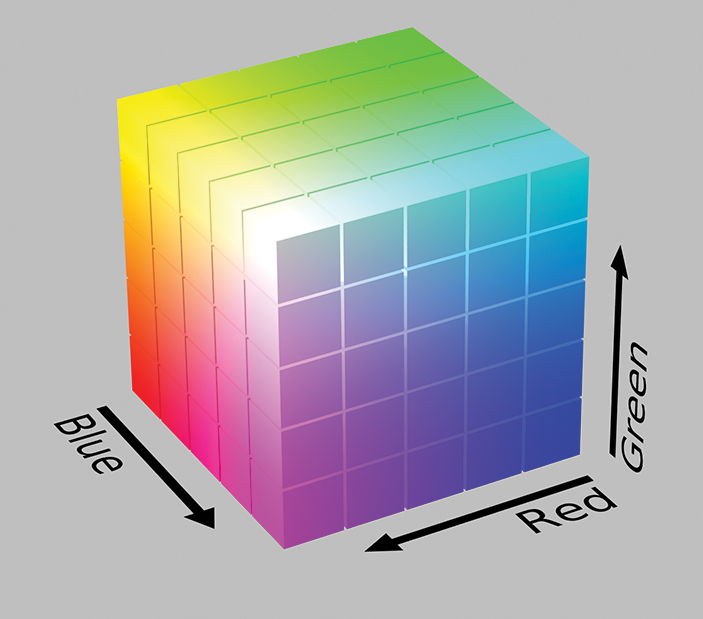
The rectangular RGB diagram makes the three component axes visible. section 11.2.1
Figure 11.11 HSL polar color space
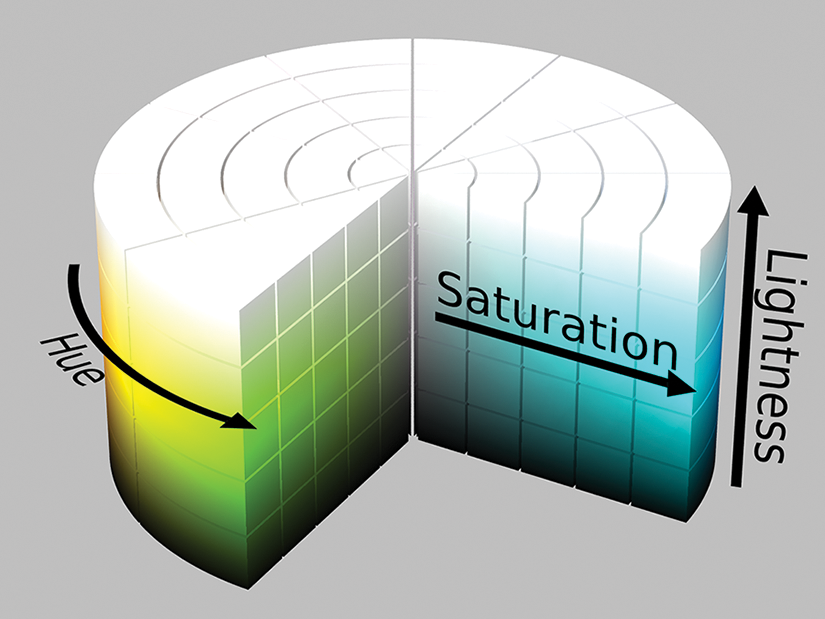
Compare the HSL cylinder with the RGB diagram to see how hue offers a different way to navigate color. section 11.2.1
Choosing a CSS notation
The value #80c090 records red, green, and blue as hexadecimal components; rgb() can express those same components as decimal values. Both are limited to the sRGB gamut. When adjusting a palette by hue or lightness, hsl() offers a more intuitive approach and broad browser compatibility. oklch() is another intuitive option, but as of mid-2024 newer notations may need fallback values for older browsers. section 11.2.2 section 11.2.2
Color space also matters between chosen colors: specifying a gradient’s color space controls how its colors are interpolated. For a reusable design, choose notation for the adjustments and browser support you need, rather than treating every representation of a color as equally convenient. section 13.4 section 11.2.2

