A color space is a way to quantify and encode color as values along defined dimensions. Most use three axes, much like X, Y, and Z coordinates. Hue names the color family; lightness describes dark to light; saturation describes gray to pure color. section 4.0 section 4.2
The coordinates matter because the same endpoint colors can produce noticeably different gradients when a different space is used between them. For continuous data, a palette is a curve through a color space: its changing colors should communicate both order and value. section 4.3.1
Common representations support different jobs:
- RGB represents screen colors with red, green, and blue values from 0 to 255. Cyan, for example, is (0,255,255); the same values can be written as hexadecimal. section 4.2.1
- CIELAB, or L*a*b*, is device-independent: L* runs from black (0) to white (100), while a* spans green to red and b* spans blue to yellow. section 4.2.4
- When building a sequential gradient, vary lightness as well as saturation. Changing only saturation can make values hard to distinguish in grayscale or against the background. section 4.3.1
Choose a gradient that keeps values visible
A single-hue ramp can emphasize large values but let low values disappear into a light or dark background. A two-hue ramp, with lightness changing too, gives every value a visible color and can improve distinction for impaired color vision. section 4.3.1
Figure 4.24 If we use different color spaces, we can generate four different palettes from the same two colors, a candy-apple-red on the left and a dark cyan on the right. Don’t believe me? Check out the extreme left and right sides of each legend, and you’ll see that they really are the same two colors!
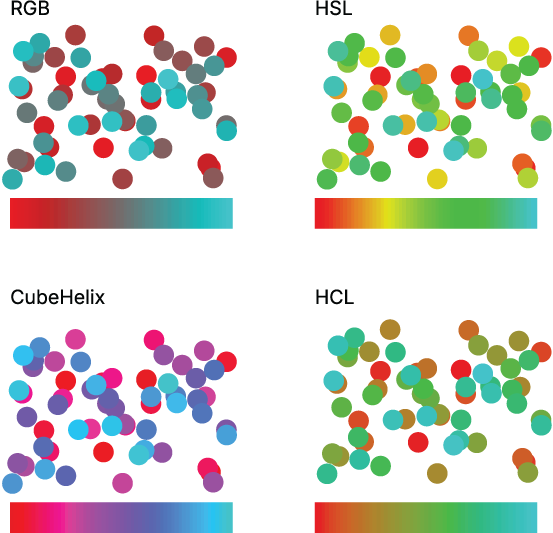
Compare four palettes created from the same red and cyan endpoints. The middle colors change with the chosen color space, even though the endpoints remain identical. section 4.3.1

