A color wheel is a circular chart that organizes the color spectrum and makes relationships between hues easier to identify. It gives developers a practical starting point for choosing colors rather than guessing, while helping connect visual choices to mood, perception, readability, and accessibility. section 9.2 section 9.0
Use the wheel to guide color decisions:
- Start with the basic spectrum—red, orange, yellow, green, blue, and purple—or use a wheel with more intermediate hues. section 9.2
- Use color relationships such as monochromatic, complementary, analogous, triad, or split complementary when building a scheme. section 9.9
- Adjust lightness and saturation to create shades and tints from a base hue. section 9.9
- Check text contrast and add icons or labels when color alone would convey information. section 9.9
Choosing a web color scheme
When a website or web app needs a color scheme, begin with a base hue and inspect its relationships on the wheel. Select a relationship that supports the intended feeling, then refine the result with shades, tints, contrast testing, and non-color labels where needed. section 9.9 section 9.0
Figure 9.7 Different levels of color granularity in color wheels are common. The one on the left is a basic color wheel with 12 colors, and the one on the right has 24 colors.
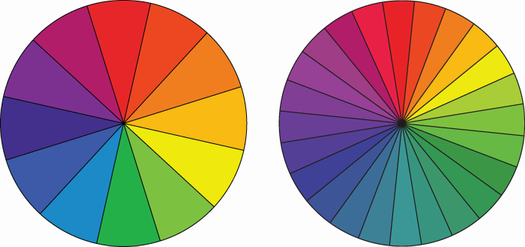
Compare a basic 12-color wheel with a 24-color wheel to see how changing granularity reveals more intermediate hues. section 9.2

