A color wheel arranges hues around a circle so their relationships are easy to see. Its circular form began with Newton, who bent the visible spectrum into a loop after comparing its intervals to a musical scale. The wheel is a useful map rather than a tiny paint store: it helps compare hues, anticipate combinations, and give color choices a bit of structure. section 4.1.1
Figure 4.3 Newton’s color wheel, which communicates color relationships by relating them to music. The letters A through G on the outside represent the 7 + 1 (back to A) tones of the chromatic scale. (Isaac Newton, Public domain, via Project Gutenberg)
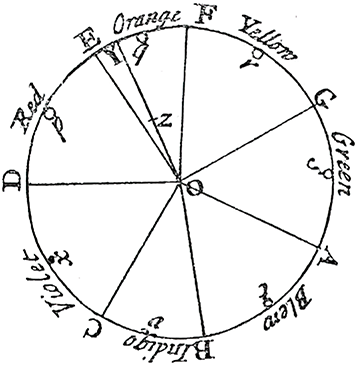
Newton’s wheel makes the central idea visible: hues occupy positions around a cycle, allowing relationships and combinations to be reasoned about spatially. section 4.1.1
The circle can also describe hue numerically. In HSB/HSV, hue runs from 0 to 360 degrees: red is both 0° and 360°, while moving upward or downward shifts a hue toward neighboring colors. Starting with green at 120°, for example, increasing toward 150° pushes it toward blue; decreasing toward 90° pushes it toward yellow. Saturation and brightness then change how vivid or light that selected hue appears. section 4.2.2
Figure 4.15 The HSB color wheel (constant 100% saturation and brightness), with the hue values labeled
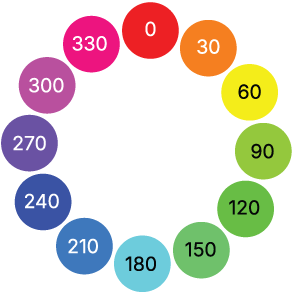
The labeled HSB wheel connects each hue’s position to a degree value, making small hue adjustments easier to predict. section 4.2.2
For palette making, use the wheel to choose hues that are balanced around it. This is a practical starting point for a categorical palette, where colors need to be distinguishable as separate groups. It is not magic—there are a great many palette tools—but wheel-based schemes provide a familiar way to generate an initial set before adjusting it for the actual design. section 4.3.3
Common wheel-based schemes include:
- Complementary: two colors directly opposite each other. section 4.3.3
- Split complementary: one color plus the two hues adjacent to its opposite. section 4.3.3
- Analogous: neighboring hues; three is an example, not a required limit. section 4.3.3
- Triadic: three hues positioned as an equilateral triangle. section 4.3.3
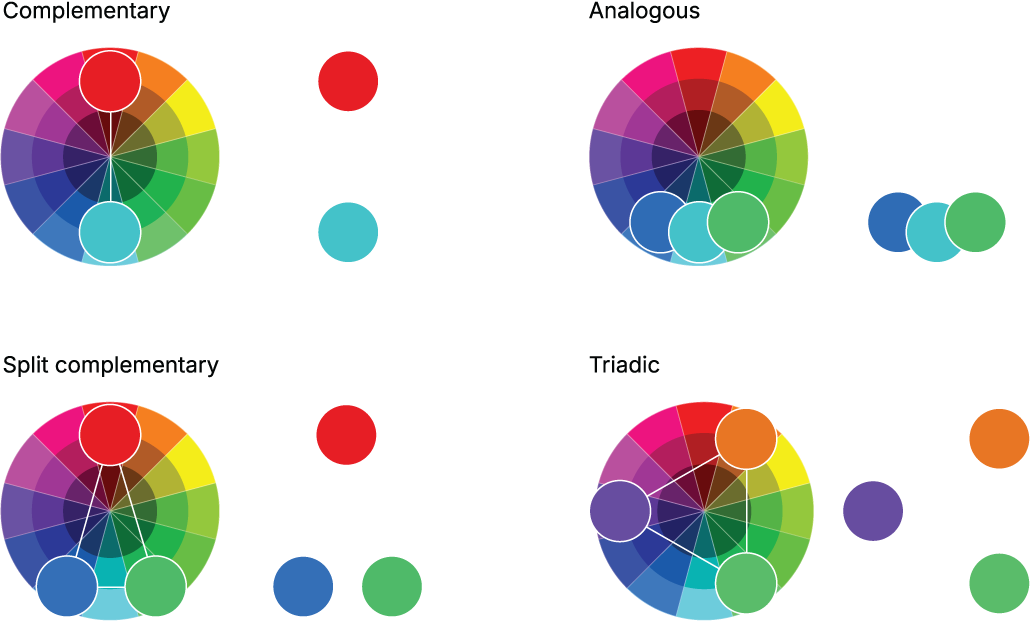
These diagrams show how geometric positions on the wheel become repeatable palette patterns. section 4.3.3
From green to a warmer or cooler neighbor
Take a green hue at 120° in HSB. Nudge it down toward 90° to move it toward yellow and make a warmer green; nudge it up toward 150° to move it toward blue for a cooler, more mellow green. The wheel makes the direction of that change legible before you make it. section 4.2.2

