A component hierarchy organizes a React interface as nested parent–child components. At scale, the structure becomes an architectural concern: it affects reuse, modification, maintainability, and how teams reason about complex UIs. section 2.2.5
Use the hierarchy deliberately when:
- Building a complex form from separate inputs, validation messages, and control buttons. section 2.2.5
- Reusing and recombining UI components in different configurations. section 2.2.5
- Inspecting parent–child relationships, memoization, props, and state while diagnosing behavior. section 4.4.3
Inspecting a dark-mode hierarchy
A dark-mode application can expose a hierarchy containing Header, ToggleButton, Button, and Title components. React Developer Tools can display the tree, reveal memoized nodes, inspect or change props, manipulate supported hook state, and show the resulting component re-render. section 4.4.3
Figure 4.8 The initial view in the components inspector as you connect to the dark mode application. You can see the entire component tree on the left and an empty inspector on the right. Notice that several extra tools are included: the inspector toggle, a search field, a settings gear, and a small tag highlighting memoized components.
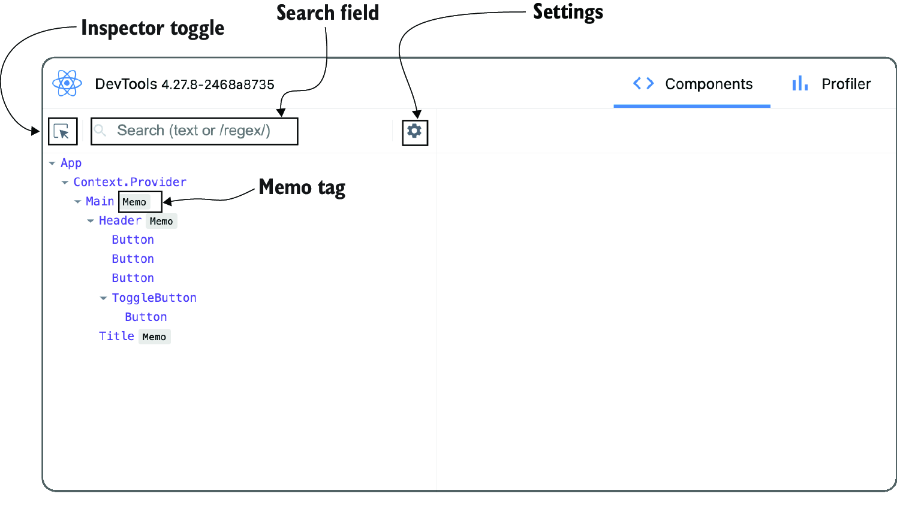
Use the component-inspector view to see the complete hierarchy, search or filter nodes, identify memoized components, and select a component for inspection. section 4.4.3

