A component hierarchy organizes a React interface as a tree of parent and child components. Parents compose children, pass properties downward, and divide responsibility across the interface. The hierarchy turns a desired HTML result into an implementable JSX structure. section 11.1.2 section 11.7
Design a hierarchy by working from the visible interface toward increasingly complete behavior:
- Start with the desired HTML output, then choose components that can render equivalent JSX. section 11.2.1
- Balance complexity and responsibility instead of creating either one component for everything or one component for every HTML node. section 11.1.2
- Begin with a static, stateless structure and add state, lists, and other complexity gradually. section 11.7
- Pass data through intermediate components when necessary, while recognizing that unused forwarding can make a hierarchy verbose. section 10.1
Dashboard and menu hierarchies
A dashboard can place Header and Main beneath Dashboard, then render UserButton and Welcome deeper in the tree. If the user name originates at Dashboard, it may pass through Header and Main even though those components only forward it. A website menu uses App, Menu, and MenuItem; passing an array of links lets Menu render a dynamic number of MenuItem instances. section 10.1 section 11.3.3
Figure 11.11 We now pass a property to the Menu component from App, and we then use that property to generate a dynamic number of MenuItem instances.
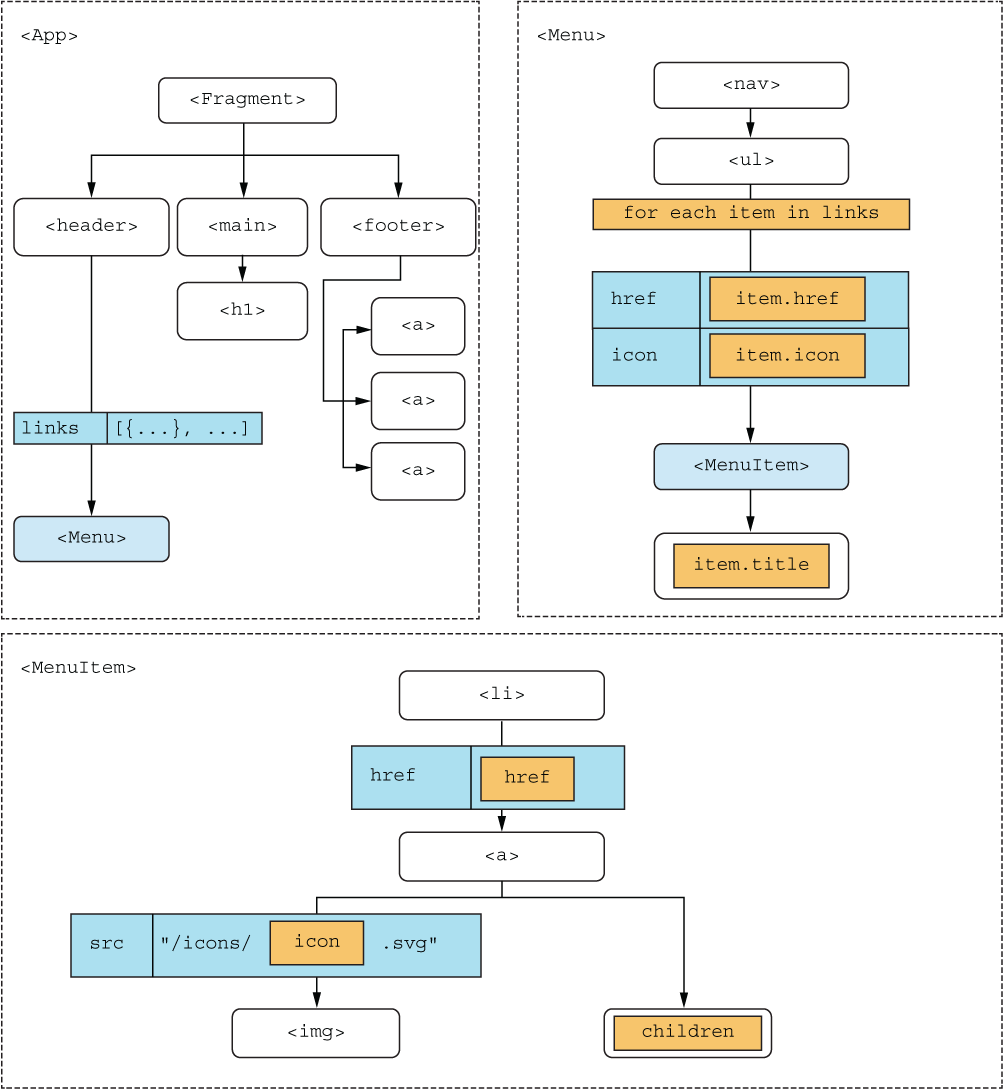
Use the hierarchy diagram to follow data from App to Menu and from Menu to its dynamically generated MenuItem instances. section 11.3.3

