liveBook · Manning

Connector

As explained in AI for Everyday IT

A connector is a software integration component that exposes access to an external service or data source for an application or workflow.

A connector is a prebuilt integration that lets applications and services communicate without complex coding. In Teams Workflows, connectors link workplace tools and support reusable automation. section 7.3

When configuring a connector, check these practical details:

  • Browse available connectors alongside their triggers and actions. section 7.3.1
  • Confirm that each connector is ready before creating the flow. section 7.3.1
  • Log in and authorize the connection when prompted. section 7.3.1
  • Check for a premium indicator because some connectors are not free. section 7.3

Sentiment workflow

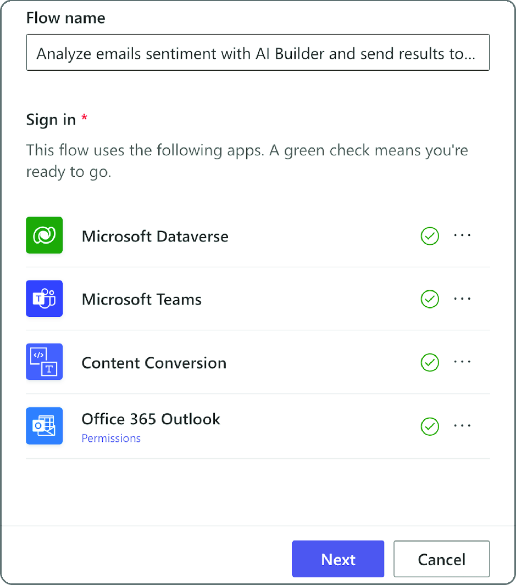
Choose the Teams workflow template “Analyze email sentiment with AI Builder and send results to Teams.” Verify its email and Teams connectors, authorize any unfinished connections, select the senders or folder to monitor, and choose the recipient or channel for the result. section 7.3.1

Figure 7.9 Validating connectors in Teams
figure

Use the connector-validation view to check whether required connections are ready before creating the workflow. section 7.3.1


How AI for Everyday IT covers it

How deep it goes
Defines prebuilt integrations and demonstrates browsing, validation, authorization, and configuration rather than writing integration code.
Examples
Uses an AI Builder email-sentiment flow that posts results to Teams and can monitor selected senders or folders.
What it assumes
Assumes basic navigation of Teams and access to the relevant accounts; avoids requiring advanced coding knowledge.
What you can do after
Operate/configure Teams workflows by selecting connectors, authorizing connections, and setting email and Teams destinations.
How it connects
Links Microsoft Teams, Power Automate, Outlook, AI Builder, workflows, triggers, and actions.

Also explained in

Compare how 7 books explain connector →

Related concepts

This explainer was generated by Manning's knowledge graph from the text of AI for Everyday IT. The section links point to the parts of the book it draws on.




