A connector is a configured data pipeline between Kafka and an external system. It runs in a Kafka Connect cluster using an installed connector plugin: the plugin supplies the integration capability, while the connector’s configuration defines a particular flow. This can replace custom producer and consumer code when the job is to transfer data rather than design application-specific notifications. section 1.5.2 section 5.1.2
Direction determines the connector’s role:
- A source connector reads an external system and publishes data to Kafka topics. section 7.3
- A sink connector reads Kafka topics and sends data to an external system. Source and sink connectors operate independently. section 5.1.2 section 7.3
Replicating data to multiple destinations
Source connectors can move data from PostgreSQL and MongoDB into Kafka topics. Independent sink connectors can then consume the same topics, one writing to an MS SQL database and another to Amazon S3. For database replication, a connector might read current state through JDBC or stream changes from source logs through a CDC tool such as Debezium. section 5.1.2
Figure 5.3 Setting up Kafka Connect for data replication involves using PostgreSQL and MongoDB as source systems. Source connectors are responsible for pulling data from these systems and inserting it into Kafka topics. In turn, sink connectors pull the data from Kafka and insert it into the target systems. In this setup, both sink connectors consume data from the same topics, with one inserting the data into an MS SQL database and the other into Amazon S3.
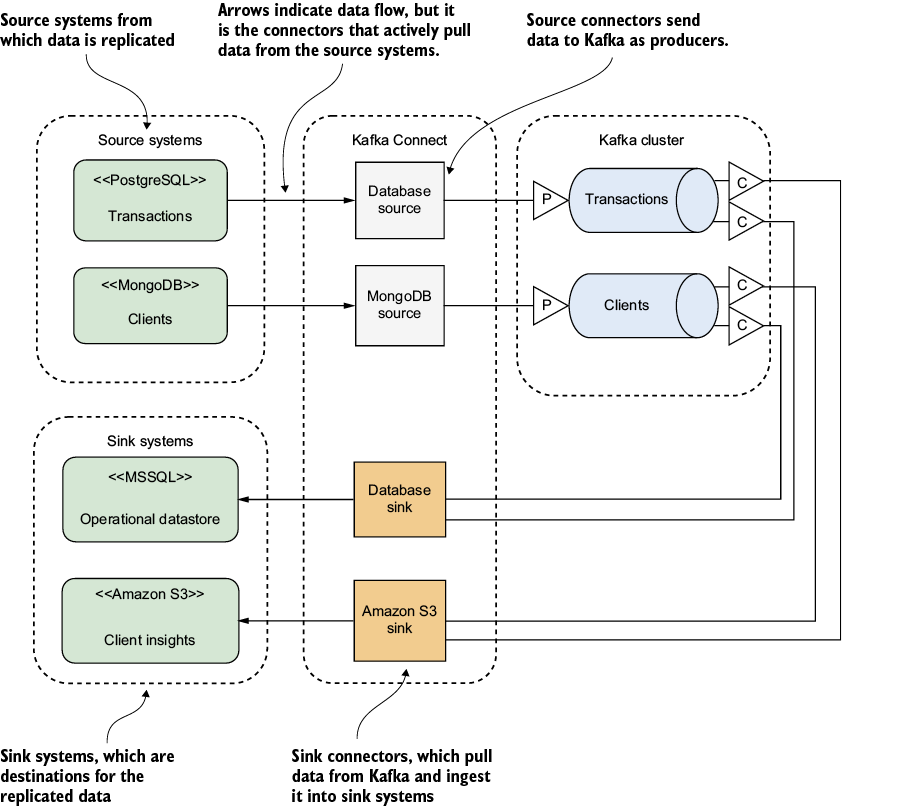
Trace the source-to-topic and topic-to-sink flows to see how one set of topics serves separate destinations. section 5.1.2
Configuration specifies details such as database connections, table-to-topic mappings, and polling frequency. Install a plugin suited to each external technology before configuring its connectors. Propagation speed is not fixed: connector settings, external-system performance, network bandwidth, and Kafka Connect capacity all matter. Treat connector settings as project artifacts alongside topic configurations and schemas so the integration remains manageable as the Kafka project grows. section 5.1.2 section 7.3 section 10.2






