A data connector integrates a selected data source with Microsoft Sentinel so its alerts or logs can be ingested for threat detection and investigation. Connectors offer a straightforward collection path across Microsoft and third-party services, while source selection should follow defined investigation use cases and required visibility. section 8.3.1 section 8.3.2
Collect beyond Azure IaaS and PaaS when identities, collaboration tools, endpoints, network controls, SaaS applications, or threat intelligence can provide evidence needed to connect an incident’s signals. Sentinel provides more than 100 out-of-the-box connectors for commonly used sources; check the Data Connectors list before considering a custom integration. section 8.3.1 section 8.3.2
Configure a connector after choosing a relevant source:
- Open Microsoft Sentinel and select Data Connectors. section 8.3.2
- Find the source’s connector, open its connector page, and follow its collection instructions. section 8.3.3
- Select the appropriate subscription where required, enable collection, and enable incident creation when alerts should create Sentinel incidents. section 8.3.3
- Account for ingestion and Log Analytics workspace storage charges; some data types, including Defender for Cloud security alerts, are free to ingest. section 8.3.3
Defender for Cloud alert ingestion
Configure the Microsoft Defender for Cloud connector in Sentinel, select the subscription where Defender for Cloud is enabled, turn on its status, and enable incident creation. Bidirectional alert synchronization is enabled by default, so closing a Sentinel incident also closes its associated Defender for Cloud alerts. section 8.3.3
For a service or application without a suitable built-in connector, the Codeless Connector Platform can expose its data through a public REST API endpoint for Sentinel ingestion. Content hub can also deploy connectors together with analytics, workbooks, and automations for an end-to-end scenario; it is positioned as the direction for connector deployment while remaining in public preview. section 8.3.2 section 8.3.4
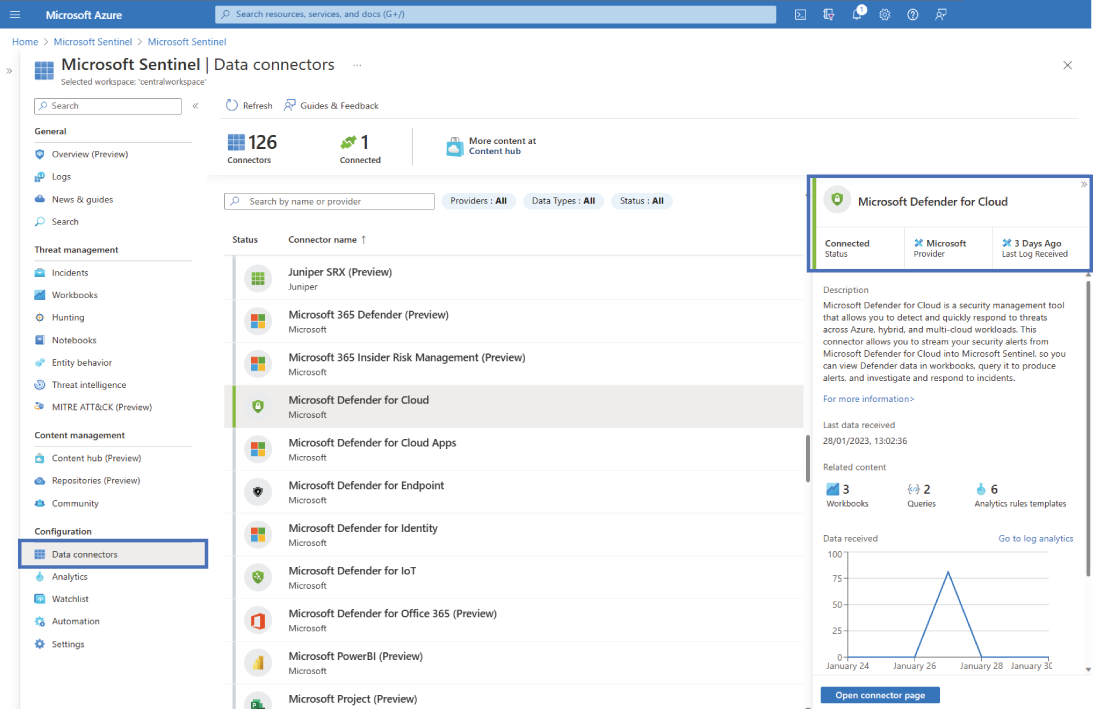
Use the connector view to recognize the Sentinel portal location for a Microsoft Defender for Cloud integration and its configuration workflow. section 8.3.3






