Suppose an online shop needs to update displayed prices while a separate service analyzes how prices affect sales. Both services can read the same Kafka topic without interfering with each other: each uses its own consumer group and tracks its own reading position. If price updates arrive faster than one service instance can process them, that service can add consumers to its group to share the work. section 6.1.1 section 9.4.1
A consumer group consists of one or more consumers with the same group ID. Kafka assigns whole topic partitions among its members, as evenly as possible. Within a group, each partition goes to one consumer, preserving that partition’s message order. Different groups can consume the same partitions independently. Kafka stores group offsets, so a stopped consumer can resume from its recorded position. section 4.2.2 section 6.1.1
Try a group at the command line
Run `kafka-console-consumer.sh --from-beginning --topic products.prices.changelog.multi-partitions-keys --group products --bootstrap-server localhost:9092`. On its first run, the consumer reads available records. After stopping and rerunning it with the same group ID, it reports zero processed messages if nothing new has arrived: the group’s offsets record its progress. Run two consumers with `--group products` in separate terminals, then produce more records. In the shown example, records for cola appear in one consumer window and records for energy drink in the other because their partitions have been divided between the consumers. section 4.2.2
Figure 4.8 Consumer groups allow us to split the processing of multiple partitions between different instances of the same service. Often, several consumer groups, not just one, consume the data from a topic. Consumer groups are isolated from each other and don’t influence one another.
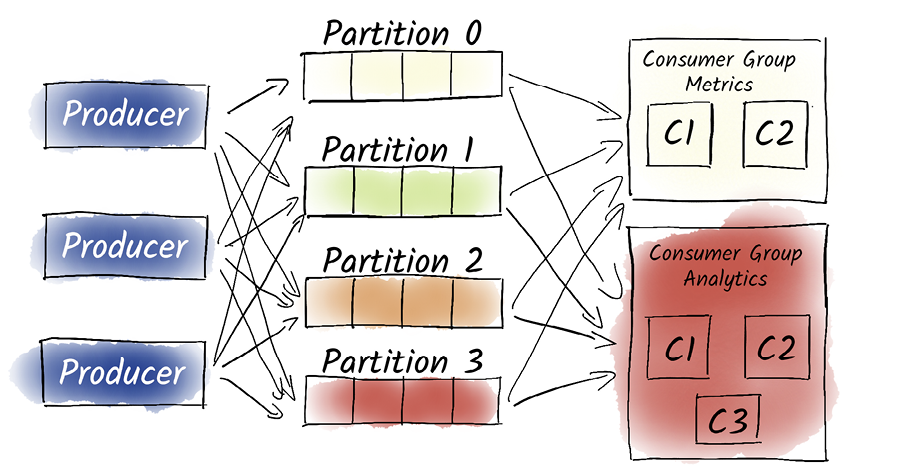
The diagram shows the key distinction: partitions are divided within a group, while separate groups read independently. section 4.2.2
Scaling has a boundary: work is distributed by partition, not by individual message, and Kafka does not guarantee order across partitions. Kafka brokers help coordinate group membership and partition assignment through the Kafka Rebalance Protocol. A change in membership or topic partitions, or a consumer failure, can trigger a rebalance; remaining members can take over failed consumers’ work. Range Assignor and Round Robin Assignor offer different assignment strategies, while static membership and Cooperative Sticky Assignor address rebalance behavior. section 6.1.1 section 9.5 section 9.4.1



