A container image is a lightweight, standalone, executable package containing an application, its dependencies, libraries, and configuration. A container is a runnable instance of that image. section 3.2.3
Use images to make application delivery reproducible and operationally manageable:
- Build an image from packaging instructions in a Dockerfile. section 3.2.3
- Assign tags such as v1, v2, or a Git commit ID to distinguish versions and deployment variants. section 3.2.3
- Push the image to a container registry so a server can retrieve and run it. section 3.2.3
- Customize notebook images with runtimes, dependencies, and configuration compatible with Kubeflow. section 7.1.5
Build and run an application image
Build hello-joker:v1 with `docker build . -t hello-joker:v1`, then run it with `docker run -it -p 8081:8083 hello-joker:v1`. The application becomes available through the host port at localhost:8081. section 3.2.3
Figure 3.3 Process of building the Docker image from the local desktop and pushing it to the container registry, which is where a server retrieves the image and runs it as a container
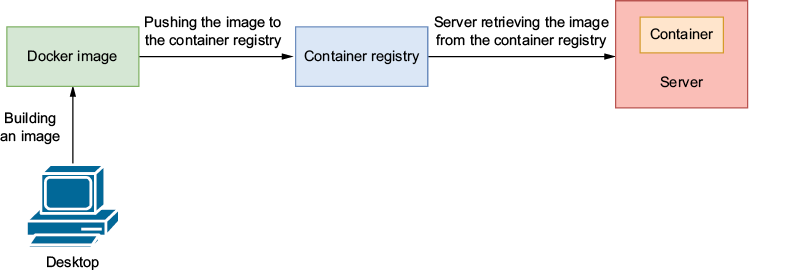
Trace the operational path from local image construction through registry storage to server-side container execution. section 3.2.3
























