A container image is an immutable package used to create containers. It bundles an application with the userspace environment, system libraries, utilities, and configuration needed to run it through a container engine. section 7.1
A Dockerfile defines how an image is assembled: choose a base image, copy application files, install dependencies, expose ports, and set the command to execute. Building the Dockerfile produces a local image that can then be run or converted. section 7.6.3 section 7.3
Container images and Wasm packages distribute different things:
- A conventional container image commonly includes application code plus a userspace environment and system dependencies. section 7.1
- A Wasm binary packages application logic and relies on WASI and a Wasm runtime for a portable system interface. section 7.1
- The additional environment makes even minimal container images typically megabyte-scale, while Wasm binaries are often measured in kilobytes and can start with less initialization overhead. section 7.1
- A container image built for one CPU architecture requires a multiarchitecture image to run on another architecture such as ARM instead of AMD. section 7.1
Figure 7.1 The typical architecture of a containerized system, illustrating how applications are packaged with their dependencies and userspace environment, all managed by the Docker engine on top of the host operating system
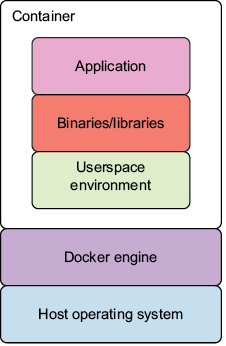
This architecture view shows the image packaging application dependencies and userspace above the Docker engine and host operating system. section 7.1
Package and convert a Flask server
Start from python:3.9-slim, install Flask, copy app.py, expose port 8000, and run python app.py. Build the image as python-wasm-webserver, then use container2wasm to create python-wasm-webserver.wasm. Run it through c2w-net to proxy port 8000 and request the server with curl. section 7.6.3
Create a minimal Wasm container image
Compile a Rust application for wasm32-wasip1, then use a Dockerfile with FROM scratch to copy the .wasm file and declare it as ENTRYPOINT. The empty base image reflects that the Wasm binary does not require an operating system inside the image. section 7.3
























