containerd is the central manager for containers on a host. It coordinates container lifecycles, containerd-shims, the host system, and external resources, and can run Wasm workloads through a Wasmtime shim. section 7.2
A containerd-based Wasm workflow connects several layers:
- Docker Engine uses runC to spawn the container process, then hands control to containerd-shim. section 7.2
- containerd coordinates shims, the host, Docker Engine, and external resources. section 7.2
- For Wasm, containerd invokes containerd-shim-wasmtime and the Wasmtime runtime instead of a conventional container process. section 7.2
Build and run a Wasm container
Install containerd, ctr, and the Wasmtime shim, then verify them with `sudo systemctl status containerd` and `which containerd-shim-wasmtime-v1`. Create a Wasm builder with `docker buildx create --name wasm-builder --driver docker-container --use`; build an OCI archive for `wasi/wasm32`; import it with `sudo ctr -n default images import --platform=wasi/wasm32 hello-wasm-container.oci`; and run it with `sudo ctr run --rm --runtime io.containerd.wasmtime.v1 --platform wasi/wasm32 docker.io/library/hello-wasm-container:latest hello-wasm-instance`. The example prints `Hello, Wasm containers!`. section 7.3.1 section 7.3.2
Figure 7.4 A closer look inside the Docker engine when executing a Wasm module, showing the key components, including containerd-shim-wasm and the Wasm runtime
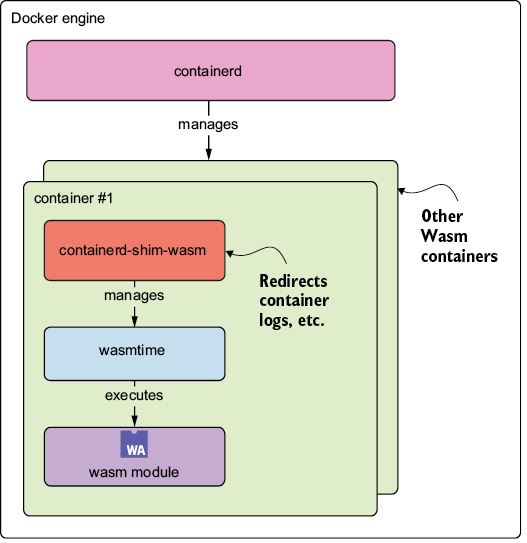
Trace the Wasm execution path from Docker Engine through containerd, containerd-shim-wasm, and the Wasm runtime. section 7.2


