Containerization packages an application and its dependencies into an isolated, portable runtime unit. Docker containers isolate processes, networking, and volumes while sharing the host operating system kernel, unlike virtual machines that include complete operating systems. section 12.0 section 12.1.2
A practical containerization workflow builds and validates a Rust web service incrementally:
- Create an Actix Web service, run it with cargo run, and test its endpoints at localhost:8080. section 12.2.2
- Define a Dockerfile that selects a Rust image, copies the project, builds a release binary, and starts it with CMD. section 12.2.2
- Build the image with docker build, inspect it with docker images, and run it with port 8080 published. section 12.2.2
- Compare the containerized service with the locally run version, then reduce the initial image size when production efficiency matters. section 12.2.2
Containerizing a Rust web service
A small Actix Web application exposes / and /hello on port 8080. A basic Dockerfile uses FROM rust, copies the project into /app, runs cargo build --release, and starts ./target/release/docker-rust. Building with docker build -f Dockerfile-basic . -t docker-rust-basic produces a runnable image; docker run -p 8080:8080 -t docker-rust-basic serves the same endpoints. The first image is intentionally large—1.32 GB—because it retains the compiler and intermediate build artifacts. section 12.2.2
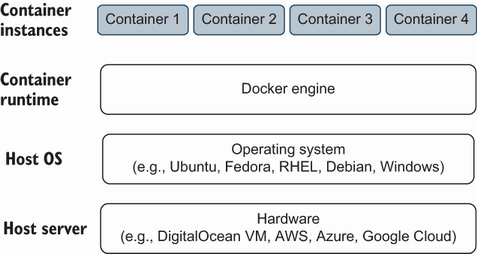
Use the Docker overview to visualize how containers sit above hardware infrastructure and share the operating system kernel. section 12.1.2

