liveBook · Manning

Content area

As explained in Build a Website with ChatGPT

The innermost region of a CSS box containing an element's text, images, or other content.

The content area is the inner rectangle of an element’s box. It contains the element’s text, image, or other page content. section 4.2.3

Understand its position within the CSS box model:

Reading an element box

For a header containing a logo and title, the logo and title occupy the content area; padding gives them breathing room, while the border and margin sit farther outward. section 4.2.3

Figure 4.4 The main parts of an element box
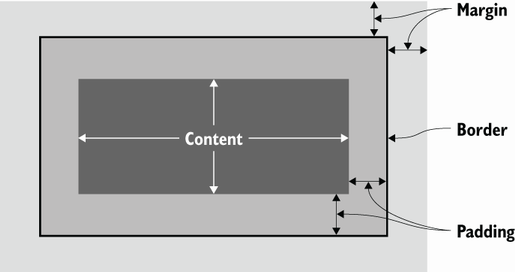
Use the diagram to see how the content area fits inside padding, border, and margin. section 4.2.3


How Build a Website with ChatGPT covers it

How deep it goes
Explains the content area through its four-part box-model relationship, without detailing sizing calculations or advanced layout behavior.
Examples
Uses text, images, headers, logos, titles, and abstract element-box diagrams as concrete illustrations.
What it assumes
Assumes basic awareness of HTML elements and begins the box model from the idea of an invisible box around each element.
What you can do after
Evaluate how padding, borders, and margins surround an element’s content when styling a web page.
How it connects
Connects content area to the CSS box model, padding, border, and margin.

Also explained in

Compare how 2 books explain content area →

Related concepts

This explainer was generated by Manning's knowledge graph from the text of Build a Website with ChatGPT. The section links point to the parts of the book it draws on.