Think of an element as a little rectangular room. The content area is the room’s inner space—the part holding the actual text, image, or other content. Padding adds breathing room around it, the border wraps around that, and the margin creates space outside the box. Together, these four parts form the CSS box model. section 9.1
Picture the box from the inside out:
- Content: the inner rectangle containing text or an image. section 9.1
- Padding: extra whitespace between the content and border. section 9.1
- Border: the line surrounding the content and padding. section 9.1
- Margin: extra whitespace outside the border. section 9.1
Sizing the inner space
By default, CSS width and height size only the content area. Padding and border make the element’s rendered size larger, while margin is outside that size. For example, a text block’s width controls its line length; around 65 characters per line is a useful reading target. If you prefer width and height to include the border, use: element { box-sizing: border-box; } section 9.2
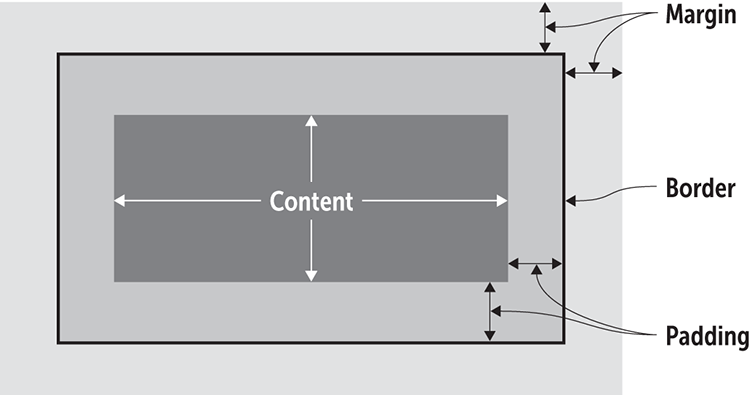
Explore the box diagram to see the content area nested inside padding, border, and margin. section 9.1

