Contrast makes one element noticeably different from another so people know where to look first. Used boldly, it creates visual interest, establishes hierarchy, and helps visitors scan a page for the next step rather than facing a field of equally weighted content. section 2.1.4 section 2.3
Color contrast is especially important for readable text, visible form controls, and accessible interfaces. Pale text on a pale or busy image can make even users without visual impairments strain to read; a light-gray input on white can be difficult to find. section 2.1.4 section 9.6
Figure 2.32 Some white text over an image that doesn’t have enough contrast for the text to stand out
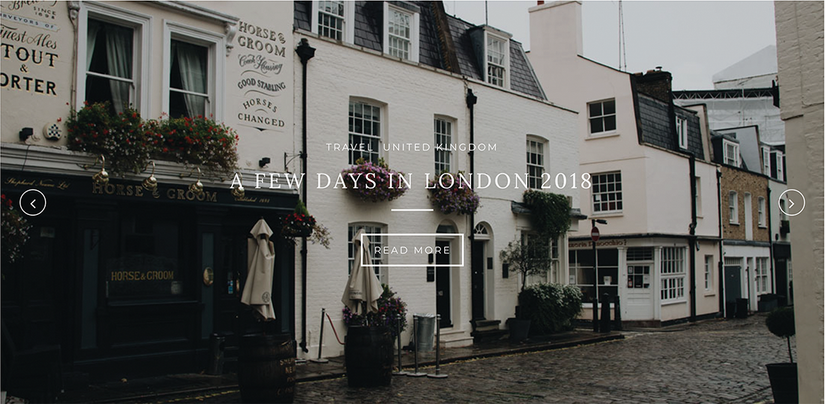
White text disappears when the photo behind it is also light or visually busy. Treat the image and text as one readability decision, not as separate decorative layers. section 2.1.4
Make a hero message readable
Start with an image dark or quiet enough for the text. If the image must remain, place a dark color treatment or partially opaque gradient over it. A solid-color shape behind the text is the simplest option when you need a dependable background to check. section 2.1.4 section 10.6.2
Create contrast deliberately through differences that users can spot quickly:
- Use color to separate a focal element from muted surrounding elements. section 2.1.4
- Use a major difference in size, such as extra-large type, to draw attention. section 2.1.4
- Use unlike shapes, such as geometric and organic forms, when the difference supports the visual theme. section 2.1.4
- Make elements extremely different when they should not be perceived as the same; slight differences can look accidental. section 2.1.4
Check foreground and background color combinations early, before they spread through mock-ups and components. Contrast checkers can report whether combinations pass or fail WCAG levels; plugins can support this work inside design tools such as Figma. Keep accessibility checks in the design process instead of postponing them until everything is built. section 9.6.1 section 9.6
Contrast works with proximity, alignment, repetition, and balance rather than replacing them. Use it to provide a starting point and guide attention, then use the other principles to organize relationships and carry the eye through the rest of the layout. section 2.1 section 2.3



