Contrast is the visual difference that makes one element stand apart from another. It catches the eye, creates visual interest, and tells viewers where to look first—whether the standout is a flower against greenery, a bright billboard, or a dashboard heading. section 5.4
In a visualization, contrast establishes hierarchy. Give the most important content stronger visual difference; let supporting content recede. Color, form, spatial position, proximity, and symmetry can all contribute, so contrast is more than making everything loudly colorful. section 5.4
Use contrast deliberately rather than sprinkling it everywhere:
- Reserve strong contrast for headings, key numbers, and data elements that deserve immediate attention. section 5.4
- Use dark neutral text on light backgrounds, or light neutral text on dark backgrounds, for readable small text. section 5.4.1
- Deemphasize secondary text by moving its color toward the background rather than adding another competing accent. section 5.4.1
- Do not use color as the only signal; pair it with position, form, or a label so the meaning survives for more viewers. section 4.4.2
Contrast also has an accessibility floor. The stated WCAG AA guidance calls for a 4.5:1 contrast ratio between ordinary text and its background, with a 3:1 ratio for large-scale text and visualization elements. Small, delicate body text is especially unforgiving: an appealing color can still be hard to read. section 4.4.2 section 5.4.1
Figure 4.34 On the left, the blue bars have no border, so the contrast is calculated between the blue and the light gray as 1.93:1, which is too low to pass WCAG’s AA level of 3:1. However, if you add a dark-gray border, the contrast is then calculated using the border against the background, which shows up better than just the plain blue bars. The contrast between the darker gray border and the lighter gray background is a whopping 8.7:1, beating out the AA level by almost a factor of two.
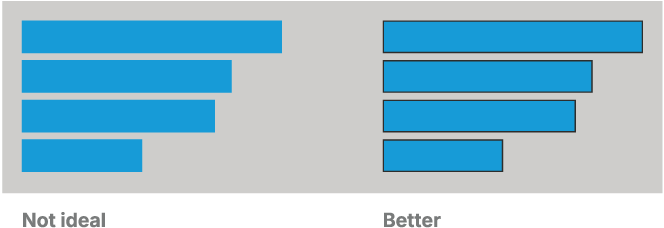
A border can supply the needed visible edge when a filled mark blends into its background. Here, plain blue bars reach only 1.93:1 against light gray, while a dark-gray border reaches 8.7:1. section 4.4.2
A monochromatic hierarchy
A restrained palette can still create a clear pecking order. On a dark dashboard, white headers carry the strongest contrast, bright green data labels and prominent numbers connect to the marks, and pale green axis labels step back. Same family, different jobs—no rainbow required. section 5.4.1



