Contrast is the difference between visual elements that helps people notice distinctions, read content, and understand how parts of a page relate. It can come from color, luminance, typeface style, image treatment, or the relationship between visual zones. section 5.8 section 6.7
Use contrast thoughtfully when refining a website:
- Check that typeface color strongly contrasts with its background so visitors can read the content easily. section 5.8
- Use differences between foreground, background, and sky to add dimensionality, while keeping the overall composition balanced. section 6.7
- Choose contrasting typeface qualities deliberately: Bodoni provides high contrast for headings, while other typefaces create more traditional, playful, or modern impressions. section 4.1.4
- Treat strong image contrast as a design decision rather than an automatic improvement; an image can stand out awkwardly when its background conflicts with the page. section 6.9.3
A contrast problem on a recipe homepage
A dark photograph of raw potatoes placed on an otherwise light, airy homepage creates sharp contrast, but not useful emphasis. Because the image is small, awkwardly placed, unrelated to the main message, and visually unlike the faded leaf image, it feels disconnected rather than integrated. Replacing or repositioning it can make the page’s visual relationships clearer. section 6.9.3
Figure 6.21 Somebody thought it was a great idea to stick random potatoes into the image in an arbitrary location and with a different background color. The kindest word to describe this suggestion is oblivious.
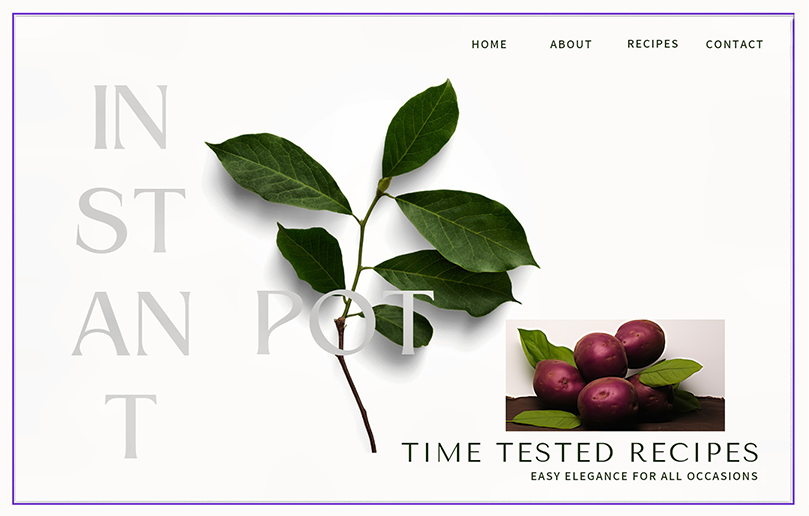
Use the figure as a quick visual reference for how arbitrary image contrast, placement, and style can weaken an otherwise cohesive page. section 6.9.3



