A controller connects a web request to the page the application returns. In a minimal Spring MVC flow, you write an HTML page and a controller action for the request; Spring Boot configures the other MVC components. section 7.3 section 7.5
For a simple page, the pieces fit together like this:
- Put the HTML document, such as home.html, in the Spring Boot project's resources/static folder. section 7.3
- Mark a class with @Controller so Spring adds it to its context as a bean. section 7.3
- Use @RequestMapping to associate a controller method with a specific HTTP request. The method returns a reference to the page. section 7.3
A home page action
A MainController method mapped to /home can return "home.html". For a first example, the method needs no additional request logic; the page can simply display “Welcome!” section 7.3
Figure 7.15 The steps for adding a static web page to your application. Add the HTML document containing the information the browser will display, and then write a controller with an action assigned to it.
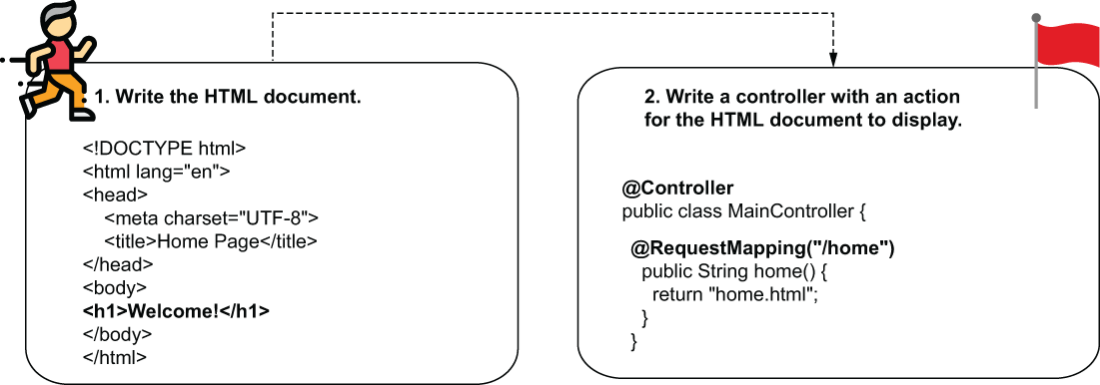
See the two-step flow: create the HTML page, then write a controller action for it. section 7.3