A convolutional layer looks for patterns in an image without losing track of where its pixels sit. Unlike a linear feed-forward layer that processes all its inputs together, it examines small regions of the image. Think of each filter as a tiny magnifying glass trained to spot a particular pattern, such as an edge. section 12.13 section 12.14
One calculation under the filter
Imagine a 3×3 filter resting on a patch of an 8×8 grayscale image. Pair each filter weight with the pixel beneath it, multiply each pair, then add the results. For one row, filter values [2, 7, 2] and pixels [11, 2, 1] give (2×11) + (7×2) + (2×1) = 38. The filter slides right and repeats the calculation at the next position. section 12.14
Figure 12.24 How a CNN filter scans an image
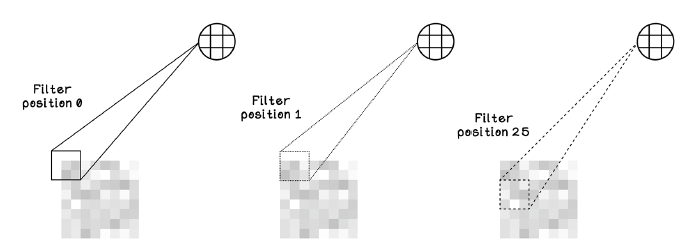
Follow the filter across the image to see how each local patch contributes a value. section 12.14
The values produced by one filter form a feature map. Different filters can learn different patterns; their weights begin randomly and change during training. An image may have one channel for grayscale or three for red, green, and blue. section 12.14
Eight views of a noisy image
In a U-Net encoder, eight distinct 3×3 filters scan an 8×8 noisy image. With padding to retain its dimensions, they produce eight 8×8 feature maps: an 8×8×8 tensor. A NumPy implementation pads the image, loops over filters and positions, multiplies each local patch by its filter, and adds that filter’s bias. section 12.17
Convolution can work alongside pooling to summarize image patterns for recognition. In a U-Net, encoder convolutions help capture broader context as the image is downsampled; a related learnable operation, transposed convolution, enlarges feature maps in the decoder. The practical distinction is direction: a regular convolution reads a patch to produce a value, while a transposed convolution uses a value to contribute to a larger patch. section 9.29 section 12.19