A cookie is browser-stored data that returns with later requests, letting a website remember authentication without asking users to log in repeatedly. section 3.1
A practical cookie flow looks like this:
- After login, the server can place a random session string in the browser and associate it with the user in a temporary database. section 3.1
- The browser sends the cookie with subsequent requests, avoiding repeated credential submission. section 3.1
- A username stored directly in a cookie can be edited to impersonate another user, so untrusted cookie contents need authentication. section 3.1
- A message authentication code uses a secret key to produce a tag that exposes tampering when the cookie changes. section 3.1
Session cookie
A user logs in once; the server generates a random string, stores it under the user’s nickname, and gives the browser that string to resend. section 3.1
Figure 3.4 A malicious user tampers with his cookie but cannot forge a valid authentication tag for the new cookie. Subsequently, the web page cannot verify the authenticity and integrity of the cookie and, thus, discards the request.
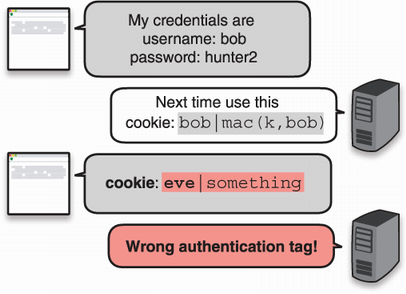
Shows a tampered cookie failing authentication because the attacker cannot forge a valid authentication tag. section 3.1









