Cross-origin resource sharing (CORS) lets an API tell a browser which other origins may access it from JavaScript. An origin is the combination of scheme, domain, and port. Changing `http` to `https`, adding a subdomain, or changing the port makes an origin different. Without permission from the API, the browser prevents the JavaScript app from reading a cross-origin response. section 29.3 section 29.3.1
A shopping app calls a separate API
Suppose JavaScript at `http://shopping.com` requests products from `http://api.shopping.com`. Those are different origins, so configure CORS on the API—not on the shopping app. A policy can permit `http://shopping.com` while leaving other origins unapproved. section 29.3 section 29.3.2
CORS works through HTTP response headers. An API uses them to state which origins, methods, and headers it permits. For some requests, the browser first sends an `OPTIONS` preflight request to check permission; if the response permits the request, the browser sends the actual request. A response without the needed CORS headers may contain data, but the browser will not make that data available to the JavaScript app. section 29.3.1
Figure 29.7 Two cross-origin requests. The response to the GET request doesn’t contain any CORS headers, so the browser blocks the app from reading it, even though the response may contain data from the server. The second request requires a preflight OPTIONS request to check whether CORS is enabled. As the response contains CORS headers, the browser makes the real request and provides the response to the JavaScript app.
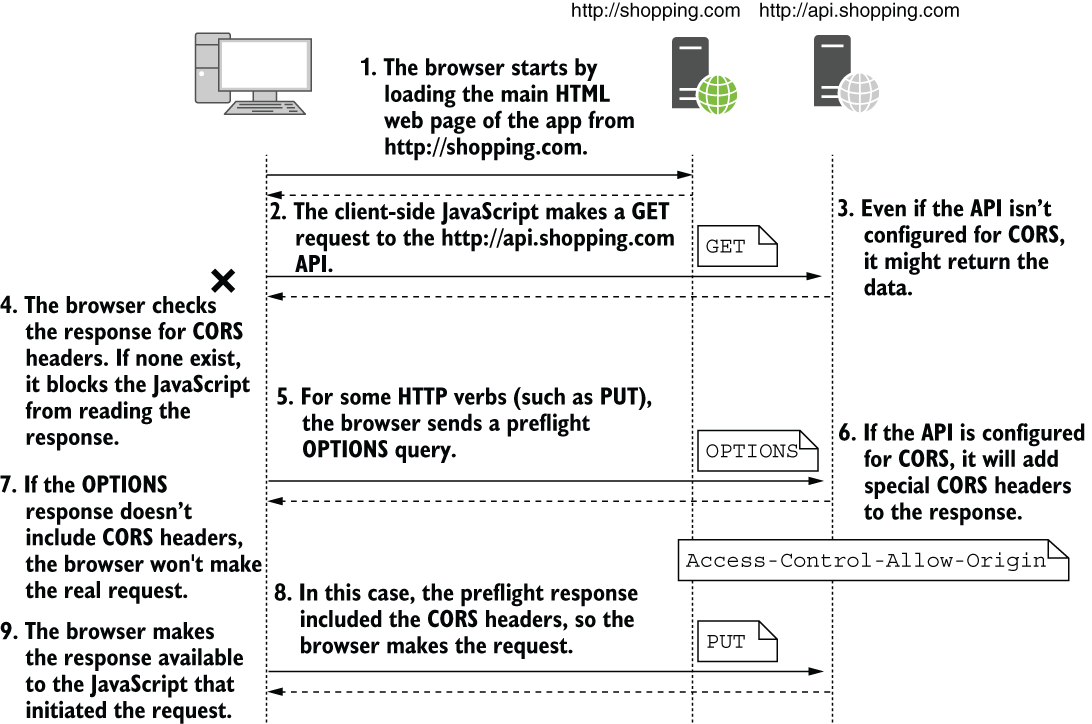
Compare a response the browser withholds from JavaScript with a request that succeeds after an OPTIONS preflight. section 29.3.1
To enable CORS in an ASP.NET Core API:
- Register CORS services with `builder.Services.AddCors()`. Define a named policy with `AddPolicy()`; for example, use `WithOrigins("http://shopping.com")` to permit the shopping app. Do not add a trailing slash to the origin. section 29.3.2
- Add `app.UseCors("AllowShoppingApp")` to apply that policy throughout the app. When using endpoint-specific policies instead, call `app.UseCors()` without a default policy, then apply `RequireCors("AllowShoppingApp")` to a minimal API endpoint or route group, or `[EnableCors("AllowShoppingApp")]` to a controller or action. section 29.3.2 section 29.3.3
- Place CORS middleware after routing so it can identify the selected endpoint and its policy. Avoid combining a default policy with endpoint-specific policies unless you intend both to apply. section 29.3.3
Enable CORS only when another origin needs the API, and prefer limiting it to the endpoints that need access. Policies can restrict origins, HTTP methods, request headers, exposed response headers, and credentials. Start with the required origins, then adjust permissions for the requests you actually need. A reverse proxy or application gateway can also configure allowed origins. section 29.3.3 section 29.3.4




