Cross-origin resource sharing (CORS) controls whether a browser accepts a web page’s requests to resources hosted on another origin. Browsers reject these responses by default, which matters when separate frontend and backend applications use domains such as example.com and api.example.com. section 10.0 section 10.4
Configure CORS by controlling the response headers that describe the permitted cross-origin request:
- Access-Control-Allow-Origin identifies the permitted origins. section 10.1
- Access-Control-Allow-Methods restricts permitted HTTP methods, such as GET. section 10.1
- Access-Control-Allow-Headers restricts which request headers clients may send. section 10.1
- Spring Security adds none of these headers by default, so the browser rejects the response even when the endpoint processes the request. section 10.1
Allow one frontend origin
Place @CrossOrigin("http://localhost:8080") above the /test endpoint. The browser can then accept the endpoint’s HELLO response when called from that origin. Configure multiple origins, methods, and headers explicitly; avoid wildcard origins and headers because broad permissions can expose the application to cross-site requests. section 10.2
Figure 10.1 Cross-origin resource sharing (CORS). When accessed from example.com, the website cannot make requests to api.example.com because they would be cross-domain requests.
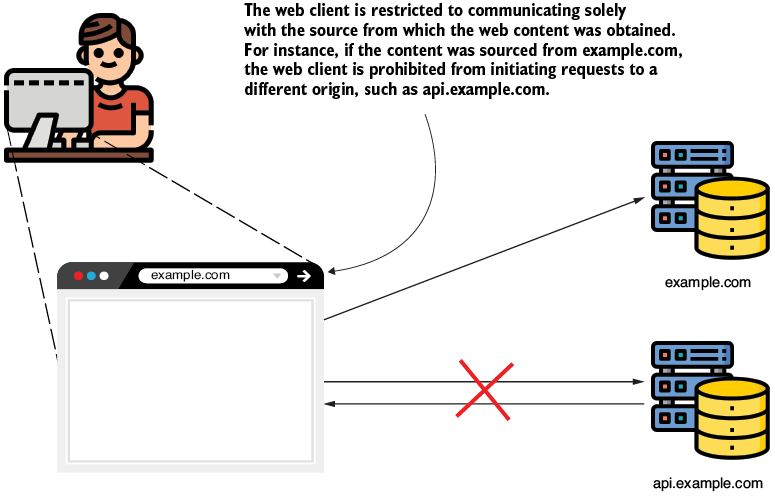
Use the origin diagram to visualize why a page loaded from example.com cannot automatically access api.example.com. section 10.0




