A counter is a cumulative metric for occurrences such as HTTP requests or ranked recommendations. Its value increases over time and can reset to zero when the application restarts. section 3.5 section 11.1.2
Implement a counter in an application by:
- Defining it with the Prometheus client library and a name and description. section 3.5
- Incrementing it with its inc method when the tracked event occurs. section 3.5
- Exposing the application's /metrics endpoint so Prometheus can scrape the value. section 3.5
- Querying and charting the resulting time series in Prometheus and Grafana. section 3.5 section 11.1.2
Counting ranked recommendations
A movie recommender can increment a Counter whenever ranked movies are present in a request. Plotting that counter in Grafana reveals cumulative activity and helps teams monitor trends or detect anomalies. section 11.1.2
Figure 3.17 Application 1 and Application 2 expose an endpoint for metrics. Prometheus scrapes those metrics, which are then visualized by Grafana. Alertmanager uses those metrics to check if any alerts need to be routed to a channel; in this case, it’s an email.
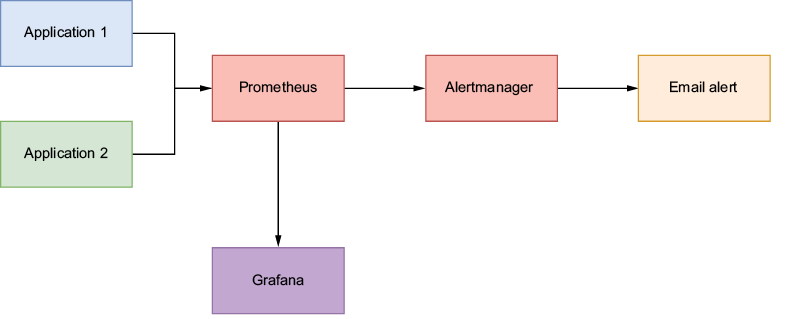
Trace the production path from application metrics endpoints through Prometheus scraping and Grafana visualization, with Alertmanager available for routing alerts. section 3.5



