Cropping trims content from one or more image edges. Use it to reframe an image, change its aspect ratio, improve balance, and make the main subject easier to notice. A good crop does not merely make an image smaller: it decides what viewers see first and how much surrounding context remains. section 6.8.1 section 6.8.2
A practical guide is the rule of thirds: divide the image into nine equal areas with two horizontal and two vertical lines. When possible, place a focal point on a grid line or one of the four intersections. This can create a stronger, less static composition without relying on strict symmetry. section 6.8.1 section 6.8.2
To crop with a grid-based crop tool:
- Identify the image’s main focal point. In a portrait, the eyes are often a useful starting point. section 6.8.3
- Drag the crop tool’s handles to resize and reposition the frame until the focal point reaches a grid intersection. section 6.8.2
- Check what will be removed from each side and whether the remaining scene still supplies useful context. section 6.8.2
- Try alternative shapes and proportions; a crop can shift an image between square, portrait, and landscape formats. section 6.8.1 section 6.8.2
- Compare the results and choose the version that best emphasizes what you want, rather than treating one crop as automatically correct. section 6.8.3
Move the farmhouse into focus
For a farmhouse scene, treat the brightest area of the building as the focal point. Resize the crop grid so an intersection sits on the farmhouse, removing some sky and space at the right if needed. The result can lead viewers first to the farmhouse and second to the valley around it. A further crop can restore a wider landscape shape if the first result feels too portrait-like. section 6.8.2
Figure 6.9 If possible, locate your focal point on one of these four intersections.
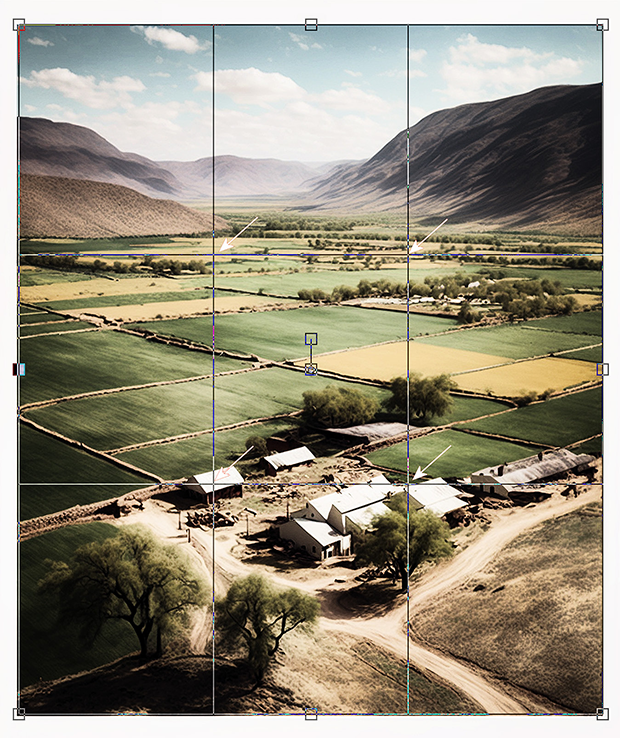
Use the grid intersections as target positions for the most important visual element before committing to a crop. section 6.8.2
AI can offer a composition critique or suggest a crop, but inspect the returned image carefully. An early attempt may contradict its own advice or remove the subject entirely. Ask for revisions, compare versions, and keep personal judgment in charge. If trimming removes needed space, outpainting takes the opposite approach by extending an image with newly generated content. section 6.7.3 section 7.8

