In a flex container, items are laid out along the main axis. The cross axis runs perpendicular to it. For a row flowing left to right, the cross axis runs from top to bottom. Change the flex direction to a column, and the cross axis runs from left to right instead. Identify the axes before choosing an alignment property: “vertical” does not always mean “cross-axis.” section 4.1 section 4.3.1
Figure 4.1 A flexbox container and its elements
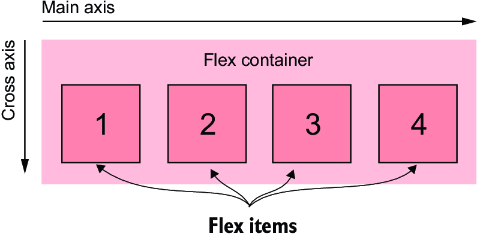
Use the container diagram to locate the main and cross axes before adjusting alignment. section 4.1
The cross axis determines what these alignment controls do:
- align-items positions all items across the cross axis. Its initial value, stretch, fills the container’s height in a row layout or width in a column layout; center and the start/end values offer other placements. section 4.4.1
- align-self overrides align-items for one item. Its initial value, auto, defers to the container’s setting. section 4.4.2
- With flex-wrap enabled, align-content controls spacing between rows along the cross axis. It is not a substitute for align-items when aligning individual items. section 4.4.1
A sidebar that changes direction
Make a sidebar a nested flex container with flex-direction: column. Its tiles now run top to bottom on the main axis, while the cross axis runs left to right. In this layout, flex: 1 acts on tile height rather than width. Height still needs a constraint for flex growth to have an effect; here, that constraint comes from the outer flex layout. section 4.3.1
Listing 4.9 Creating a flex column on the right
.column-sidebar {             #1
  flex: 1;                   #1
  display: flex;             #1
  flex-direction: column;    #1
  gap: var(--gap-size);      #1
}

.column-sidebar > .tile {
  flex: 1;                  #2
}
The listing shows the sidebar’s column direction and the flex value applied to its tiles. section 4.3.1


