Flexbox containers always have two directions to keep track of. The main axis runs with the flex items; the cross axis runs perpendicular to it. Think of them as two roads crossing: items travel along the main road, while cross-axis alignment decides where they sit across it. section 12.2
The cross axis is not permanently vertical or horizontal. It changes when you set flex-direction. With the default row direction, the main axis is horizontal and the cross axis is vertical. With column, the main axis is vertical and the cross axis becomes horizontal. Sneaky name, useful idea. section 12.2
Ask two separate questions when arranging flex items:
- Where should items go along the main axis? Use justify-content. section 12.2
- Where should items sit across the cross axis? Use align-items. section 12.2
- If items wrap onto several lines, how should those lines sit across the cross axis? Use align-content. section 12.2
Figure 12.5 The align-items values in action
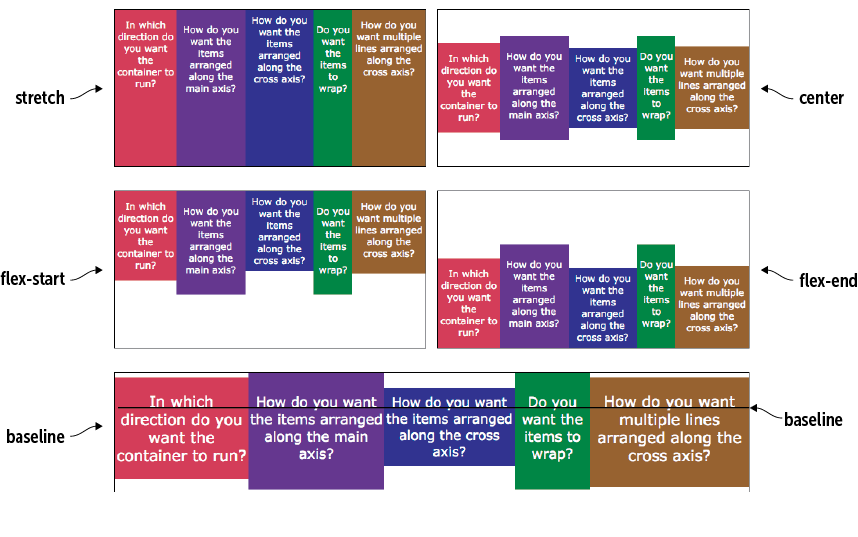
Compare the align-items values to see how flex items move across the cross axis: stretch, start, end, center, or baseline. section 12.2
Center a header logo and title vertically
A header with the default row direction places its image and heading along a horizontal main axis. That makes the cross axis vertical, so align-items: center centers the logo and title vertically within the header. Meanwhile, justify-content: flex-start keeps them at the start of the horizontal main axis. section 12.6
This distinction matters in larger layouts, too. A page body can use flex-direction: column, giving it a vertical main axis, while a nested header can keep the default horizontal main axis. Each flex container gets its own pair of axes, so check the container before deciding what “across” means. section 12.2 section 12.6


