A player ship is a player-controlled spacecraft represented by NES sprites and moved through the play area. In a shooter, it provides the player’s position for movement and later interactions with bullets, enemies, collisions, and lives. section 7.0 section 11.0
Build the ship from four coordinated sprites:
- Define four 8 × 8 patterns because the ship is larger than one pattern, then assign one pattern to each sprite. section 7.2
- Set each sprite’s Y position, pattern number, attributes, and X position in the sprite table. section 7.4
- Keep the four sprites aligned by updating their shared horizontal position whenever the ship moves. section 7.4
Movement begins by polling the gamepad. A left press decreases the ship’s X position after checking the left boundary; a right press increases it after checking the right boundary. The routine updates all four ship sprites and runs from the main game loop. section 7.4 section 7.4
Compile and verify the moving ship
Run .\compile.bat or .\compile.sh to create the NES ROM, then open megablast.nes in an emulator. Verify that the ship appears and responds to left and right input. section 7.4
Figure 7.2 Player’s ship made up of four 8 × 8 patterns
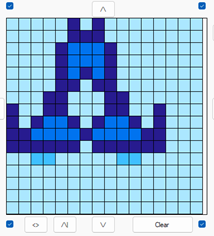
Use the figure to see how four 8 × 8 patterns combine into one larger player ship. section 7.2
