CSS describes presentation and layout through declarative rules. Its calculations position elements, scale layouts, support responsive designs, shape typography, and control transition timing. section 1.3 section 1.3.1
A centered element illustrates the hidden arithmetic: percentages measure the containing block, while transform offsets the element by half its own size. Flexbox and Grid provide alternative ways to perform related layout calculations. section 1.3.1
Use CSS math when the browser can determine values at render time:
- Combine units with calc(), such as a full-width element minus fixed horizontal padding. section 1.3.3
- Set fluid values with percentages, vw, em, and rem; these respond to container, viewport, or font-size context. section 1.3.1 section 3.7
- Keep values within bounds with min(), max(), and clamp(), which support responsive sizing and typography. section 1.3.1 section 3.7
- Prefer JavaScript when interaction, complex conditions, advanced animation, or user-driven real-time adjustment exceeds CSS’s declarative limits. section 1.3.3
Fluid width and typography
A stylesheet can combine fixed and relative values while constraining a responsive type scale: width: calc(100% - 2rem); font-size: clamp(1rem, 2vw, 2rem); The width subtracts 2rem from the available percentage. The font size varies with viewport width but stays between 1rem and 2rem. section 1.3.3 section 1.4.6
Figure 1.3 Centering an element within its containing block requires just a few CSS declarations, but behind the scenes, the browser is jumping through many mathematical hoops to get the job done.
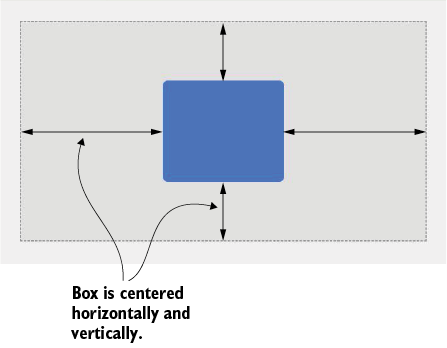
Inspect the centering diagram to connect a short declaration sequence with the browser’s box-model calculations. section 1.3.1












