CSS, short for Cascading Style Sheets, tells a browser how a web page should look. HTML provides the page’s framing: headings, paragraphs, links, and their order. CSS supplies the finishing work—typefaces, colors, spacing, layout, and even animated effects. A style is simply an instruction that changes how the browser displays something. section 1.2 section 1.6
A style sheet is a collection of those instructions. The “cascading” part means an element can receive overlapping styles from the browser, a user’s browser settings, and your style sheets; the browser resolves them before displaying the page. Think of CSS as several sets of decorating directions arriving at the same room, then being sorted out before the paint goes on. section 1.2 section 7.1
CSS is plain text, so you can write it in a simple text editor. The browser reads HTML tags and CSS properties during rendering, turning those text files into the page a visitor sees. That makes CSS pleasantly immediate: change a value, refresh the result, and see whether your idea was brilliant, terrible, or brilliantly terrible. section 1.4 section 7.1
A basic CSS style rule has a few small moving parts:
- A selector chooses the elements to style, such as `h1` for main headings. section 2.3
- A declaration gives a property and value, such as `font-size: 36px;`. The colon connects them; the semicolon ends the declaration. section 2.3
- Curly braces wrap one or more declarations into a declaration block, completing the rule. section 2.3
A heading rule
`h1 { font-size: 36px; text-align: center; font-variant: small-caps; }` selects every `h1` heading on the page, makes it 36 pixels tall, centers it, and uses small caps. One rule can style a dozen headings consistently; changing its value updates them all. section 2.3
Figure 2.4 The syntax to use for defining CSS properties
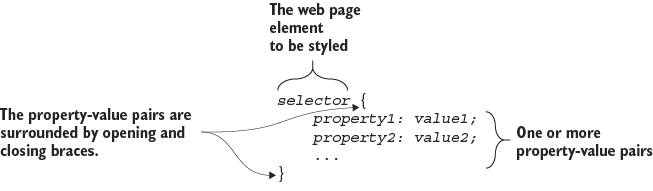
Use the syntax diagram as a quick map when a property, colon, value, semicolon, or brace has wandered off. section 2.3
CSS can live in three places. Inline styles go directly in an HTML tag’s `style` attribute. Internal styles sit inside a page’s `style` tag. External styles live in a separate `.css` file linked to the page. CSS also uses class selectors to apply rules to any element sharing a class name. section 7.1 section 7.7
The properties you choose produce visible design decisions: text font, size, bold or italic styling, alignment, indentation, text color, background color, and gradients. Measurement values can use units including `px`, `pt`, `em`, `rem`, `vw`, and `vh`. CSS is not merely decorative confetti; it helps arrange the page and give it a deliberate visual hierarchy. section 4.0 section 17.0 section 7.7
A useful way to practice is to build outward from a bare page: sketch the page, choose heading and body typefaces and a color scheme, set global styles on `body`, then fill in and style each section. Use a live editor’s Results box to test HTML and CSS, fix problems, and keep experimenting. section 5.7 section 1.5












