DataExplorer automates exploratory data analysis in R. Given a data frame, it can generate a profiling report and a set of tabular and graphical checks that quickly describe the data before deeper analysis. section 17.0 section 20.9
A practical workflow starts by preparing an analysis-ready data set, then passing that data set directly to DataExplorer functions. The package can report row and column counts, discrete and continuous columns, missing values, complete rows, observations, and memory use. section 17.4.2 section 17.4.2
For broad data profiling, DataExplorer provides functions for:
- Creating a full report with create_report(data). section 17.4.2
- Displaying introductory dataset statistics with plot_intro(data) or introduce(data). section 17.4.2
- Viewing data structure with plot_str(data), including a radial-network form through type = "r". section 17.4.2
- Checking missingness, distributions, and normality-oriented views with plot_missing(data), plot_histogram(data), plot_density(data), and plot_qq(data). section 17.4.2
- Exploring relationships and categories with plot_correlation(data, type = "c") and plot_bar(data), optionally grouped by a variable. section 17.4.2
Comparing NBA opening and closing totals
An NBA betting data set is reduced to variables for teams, venues, points, opening totals, closing totals, and month. Derived fields calculate total game points, each total's absolute error, the direction of total movement, and whether the opening or closing total was closer to the result. Calling create_report(oddsdf3) then produces a data-profiling report; further plots inspect its structure, missing values, distributions, correlations, and categorical breakdowns. section 17.4.2 section 20.9
Figure 17.1 A screen capture of a data profiling report that was created by passing a data set as the only argument to a simple function from the DataExplorer package
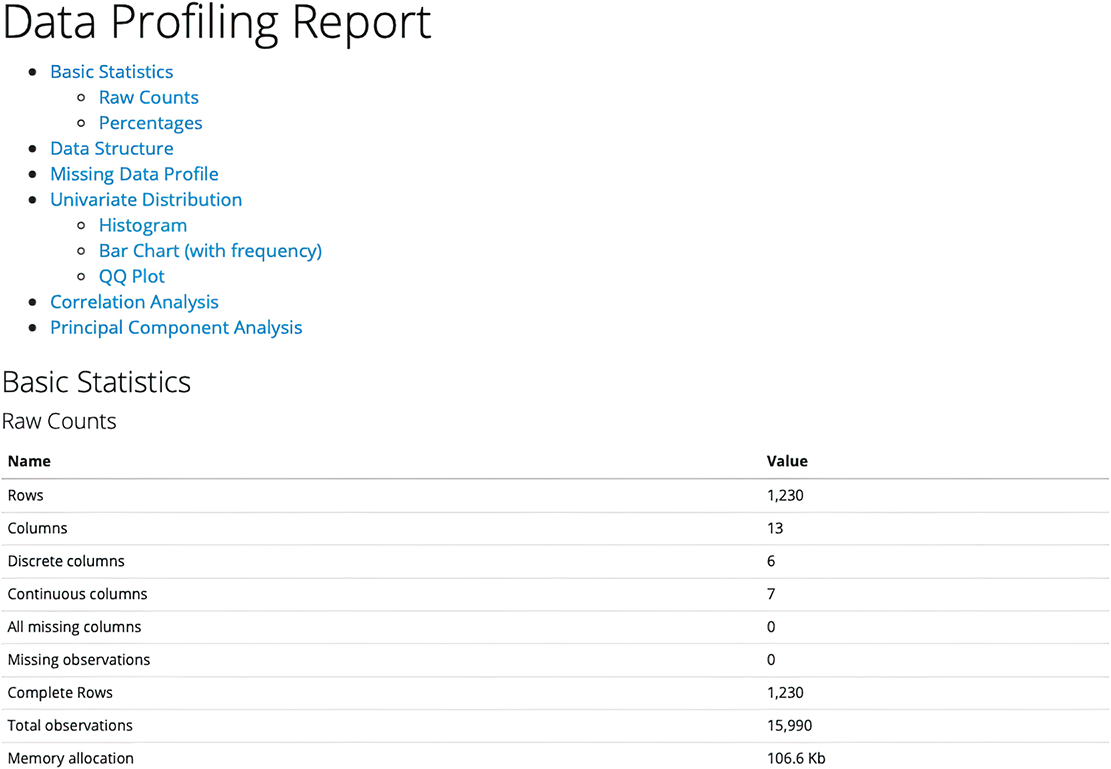
A generated profiling report shows the package's central promise: a data set can be profiled by supplying it as the only argument to a simple function. section 17.4.2
DataExplorer fits an exploratory stage rather than a final modeling stage. Its outputs help reveal the shape and quality of data and guide later wrangling, visualization, or statistical work. In the betting analysis, automated EDA contributed initial evidence that closing totals were usually more accurate than opening totals. section 20.9 section 17.4.2
