A decoy is a fabricated asset placed to look useful or exploitable to an adversary. It turns contact into high-fidelity evidence: legitimate users normally have no reason to interact with it, while an adversary’s interaction can generate detailed alerts and logs. section 10.1
Use decoys when ordinary hunting data is unavailable, incomplete, or deliberately avoided by an adversary. Make them realistic, place them where they support plausible attacker activity, monitor them continuously, and refresh them as attack techniques change. A conspicuous or implausible trap can expose the deception effort instead of attracting activity. section 10.0 section 10.1 section 10.2.1
Design decoys around the environment and the attacker behavior you want to expose:
- Deploy service-based decoys that mimic used services such as HTTP, RDP, SMB, or SSH; send an alert when a connection occurs. section 10.2.3
- Plant trace-based decoys, or breadcrumbs, including fake cookies, processes, password hashes, or documents that create alerts when used. section 10.1 section 10.2.3
- Create identity-based decoys such as fake Active Directory users, while avoiding dangerous account misconfigurations. section 10.2.2 section 10.2.3
- Limit knowledge of decoys to the operational teams that must deploy, secure, monitor, or test them. section 10.2.3
Decoy deployment is a coordinated operational task, not an isolated hunting action. Work with system administration, security engineering, identity and access management, and monitoring teams; define who receives alerts, who triages them, and which logs preserve investigation context. More decoys can improve the chance of contact, but too many or overly unusual decoys can raise suspicion. section 10.2.2 section 10.2.5 section 10.6
Credential breadcrumb for lateral-movement hunting
In a Microsoft Active Directory environment, place a fake account password hash on selected Windows clients and servers, then deploy plausible RDS servers. An intruder extracting credentials from LSASS may try the planted account against another host. Configure alerts and collect Windows Event 4688 process-creation data, including command lines, to connect the decoy interaction with processes such as credential-dumping tools and follow-on discovery activity. Confirm affected hosts, open an incident case, involve incident response, and remove the decoys and breadcrumbs when the hunt ends. section 10.2.1 section 10.2.3 section 10.2.5 section 10.2.6
Figure 10.1 How an adversary might capture breadcrumbs and play them against other hosts
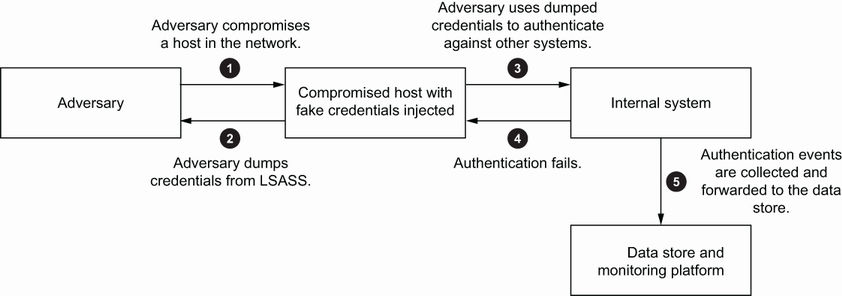
Follow the credential-breadcrumb path from an attacker’s capture of a planted artifact to attempted use against other hosts. section 10.2.3
A decoy does not guarantee detection: an adversary may never encounter it. Keep traps believable, cover enough of the intended hunting area, maintain monitoring, and choose a retention period that fits the investigation. Open-source platforms such as T-Pot and DejaVU can provide managed network-decoy deployment and monitoring alongside custom-built assets. section 10.3 section 10.6
