A dependency graph is the set of objects that must be created to create a requested root object. In an ASP.NET Core minimal API, an endpoint handler can be the root, while its services and their constructor dependencies form the rest of the graph. section 8.1 section 8.5
An email-sending example builds the graph incrementally:
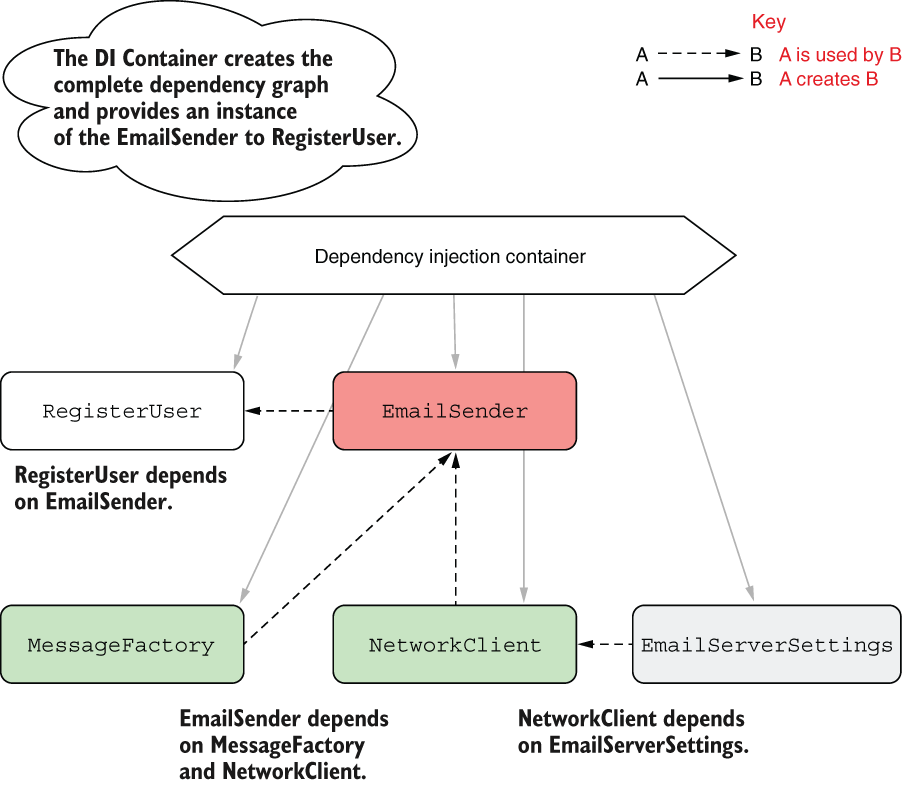
- RegisterUser needs EmailSender. section 8.1
- EmailSender needs MessageFactory and NetworkClient. section 8.1
- NetworkClient needs EmailServerSettings. section 8.1
- The DI container creates the nested objects first, then supplies the completed EmailSender to the handler. section 8.5
Injecting the graph at the endpoint
string RegisterUser(string username, EmailSender emailSender) { emailSender.SendEmail(username); return $"Email sent to {username}!"; } The handler declares only its immediate dependency. The container resolves EmailSender and the objects beneath it, removing manual construction from application logic. section 8.1 section 8.5
Figure 8.2 Dependency diagram using DI . RegisterUser indirectly depends on all the other classes but doesn’t need to know how to create them. The RegisterUser handler declares that it requires EmailSender, and the container provides it.
Compare the dependency graph before and after DI: manual construction forces RegisterUser to know every indirect dependency, while DI lets the container provide the graph. section 8.1




