Detection rate measures how often a security system correctly identifies relevant threats or events. Higher detection rates generally mean fewer anomalies or attacks are missed, but the metric should be read alongside false positives, response time, and risk prioritization. section 10.3.4 section 10.4.3
Use detection rate to connect monitoring performance with security decisions:
- Compare a baseline with a target: SecureShield increased anomalous behavior detection from 65% to 90% after refining anomaly detection and adding real-time threat intelligence. section 10.3.4
- Interpret improvement with related measures: reducing false positives and shortening prediction or response time makes a higher rate more actionable. section 10.3.4 section 10.4.3
- Set an explicit operational goal: DataGuard targeted a 90% true positive detection rate while also limiting false positives and incident response time. section 10.4.3
From missed anomalies to prioritized response
SecureShield initially detected only 65% of anomalous behavior and generated many false positives. After fine-tuning its algorithms, adding real-time threat intelligence, and adopting adaptive risk scoring, detection rose to 90% and threat-prediction time fell from eight hours to two. The result gave analysts more time to respond before threats escalated. section 10.3.4
True positives and analyst workload
DataGuard Solutions used an AI-driven anomaly detection system that learned to distinguish benign behavior from threats. Its targets combined a 90% true positive detection rate with fewer than 500 daily false positives and a one-hour average incident response time. section 10.4.3
Figure 10.2 The left side shows the advanced threat detection metric dashboard for SecureShield before implementing improvements. On the right is the metrics after implementing dynamic risk scoring with anomaly detection and real-time threat intelligence feeds.
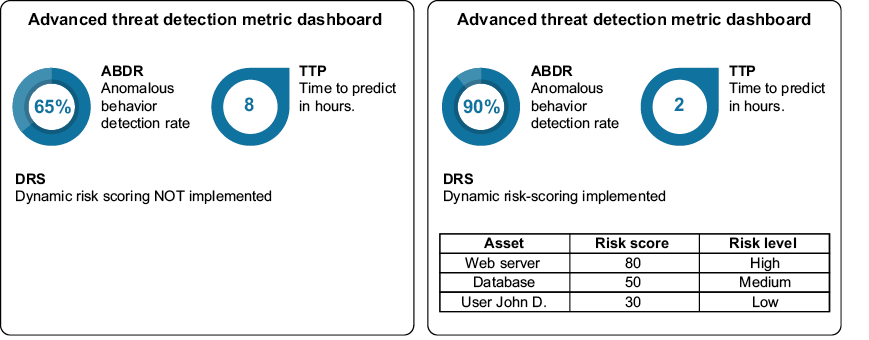
Compare SecureShield’s advanced threat detection dashboard before and after anomaly-detection tuning, real-time threat intelligence, and dynamic risk scoring. section 10.3.4
Figure 10.3 The left side shows the effectiveness of the AI dashboard, presenting daily false positive rates, true positive detection rates, and the average incident response time. On the right is its effectiveness after implementing an AI-driven solution.
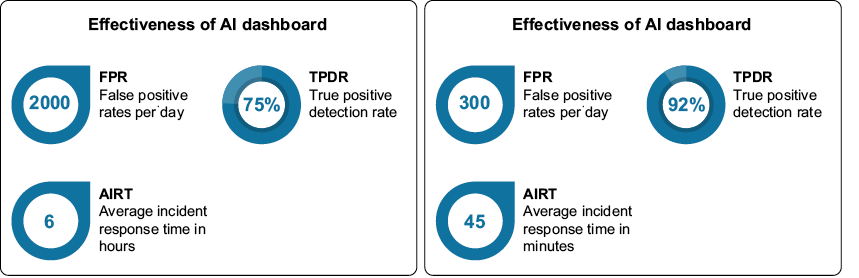
Compare DataGuard’s dashboard for false positives, true positive detection rate, and incident response time before and after AI integration. section 10.4.3
