A directory is a filesystem container that organizes files and other directories by name. A practical use is combining two picture directories into one while preserving the originals. section 9.5 section 9.5.1
A directory-based file merge separates the task into manageable steps:
- Read each filename from the source directories with os.listdir. section 9.5.3
- Compare each source file with files already in the target directory using filecmp.cmp. section 9.5.1
- Copy only files without identical matches, using shutil.copy, and rename conflicting filenames when necessary. section 9.5.3
- Test with disposable sample directories before trusting the result with important files. section 9.5.3
Merging two phone picture directories
Given pictures1 and pictures2, create pictures_combined. The example contains 210 PNG files, including 10 duplicates, so the result should contain one copy of each of 200 unique pictures. Copying rather than moving leaves both source directories intact if the program has a bug. section 9.5 section 9.5.1
Figure 9.3 Example of merging the photos in the pictures1 and pictures2 folders into the pictures–combined folder and managing the removal of duplicates
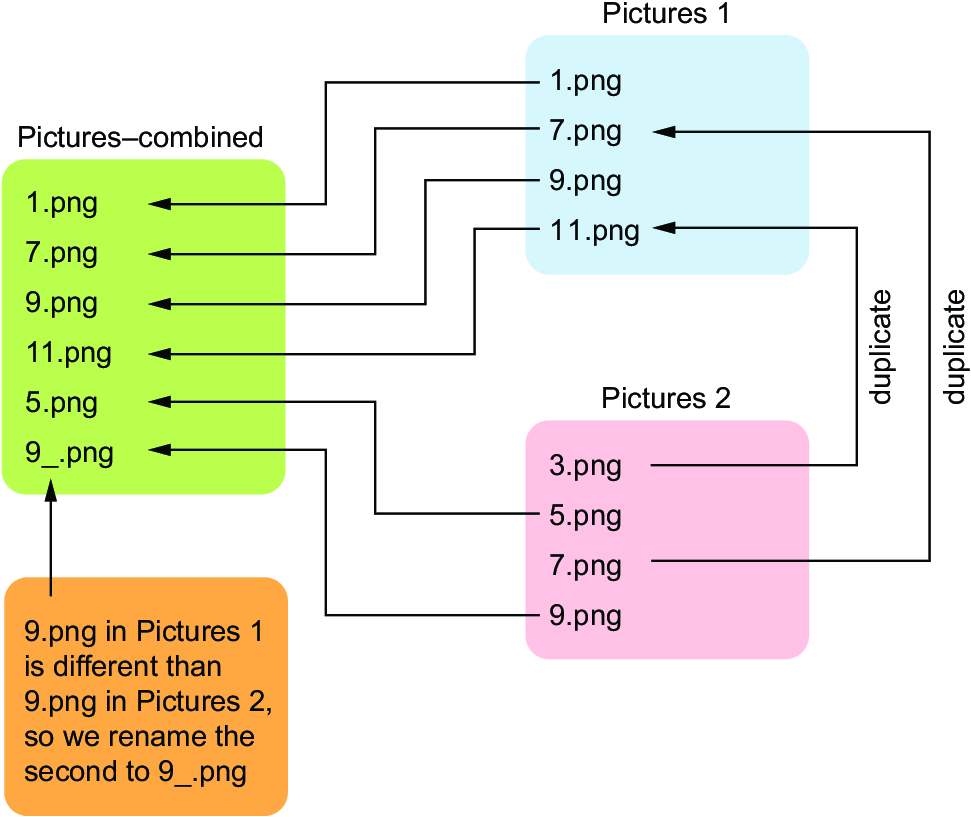
Use the figure to visualize how pictures1 and pictures2 feed into pictures_combined while duplicate files are removed. section 9.5






