A directory is a named filesystem container for files and other directories. Nesting directories solves a practical naming problem: identical filenames can remain distinct when their directory paths differ. section 2.1.2
Directory structure turns a flat collection of files into an addressable hierarchy. The path acts as a layered namespace, so organization can grow from a simple root directory into deeper, more granular groupings. section 2.1.2 section 7.0
Separating expense reports
Suppose every expense report must be named expenses.xlsx. A root directory named expenses can contain one dated subdirectory per report, keeping identical filenames separate. If reporting volume grows, additional nested directories can provide finer-grained organization. section 2.1.2
Choose structure according to the amount of separation and growth the files require:
- Use a single root directory when a small number of dated subdirectories is enough. section 2.1.2
- Add deeper subdirectories when more granular separation is needed. section 2.1.2
- Apply the same structural thinking to growing projects, where directories and namespaces help keep complexity manageable. section 7.0
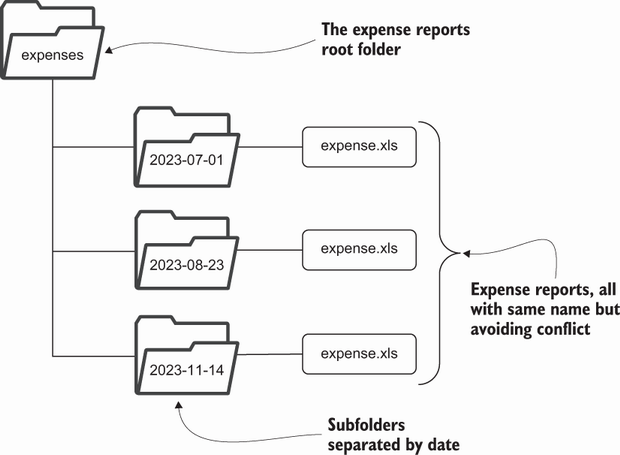
Use the simple directory diagram to compare a root directory with dated subdirectories. section 2.1.2
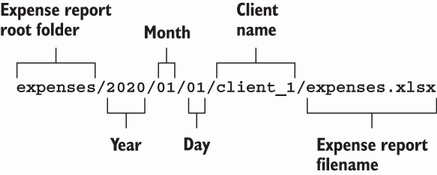
Use the more involved diagram to see how added levels provide finer file separation. section 2.1.2






