Storage capacity is the persistent disk space provisioned for database data and related processing. In MongoDB Atlas, cluster tier selection determines storage alongside memory, vCPUs, and IOPS. section 10.0
Configure capacity by weighing workload, performance, cost, and operational headroom:
- Customize storage on M10+ clusters; M40+ clusters also offer Low CPU, General, and local NVMe SSD classes. section 10.2.4
- Keep storage autoscaling enabled when automatic growth is preferred; Atlas normally increases capacity when any node reaches 90% disk usage. section 10.2.3
- Expect provider-specific growth: AWS and GCP target 70% disk usage, while Azure doubles the current storage amount. section 10.2.3
- Plan capacity before bulk inserts because preparing and copying data to new disks can lag behind sudden high-speed writes. section 10.2.3
- Remember that Atlas scales storage up automatically but never down; reducing capacity requires a manual change. section 10.2.3
Preparing for a bulk insert
Before a high-speed bulk insert, increase the cluster or storage capacity proactively instead of relying on autoscaling to react after disk usage rises. section 10.2.3
Figure 10.3 The Atlas UI’s Cluster Tier section, where you can configure cluster and storage autoscaling (Image © MongoDB 2025)
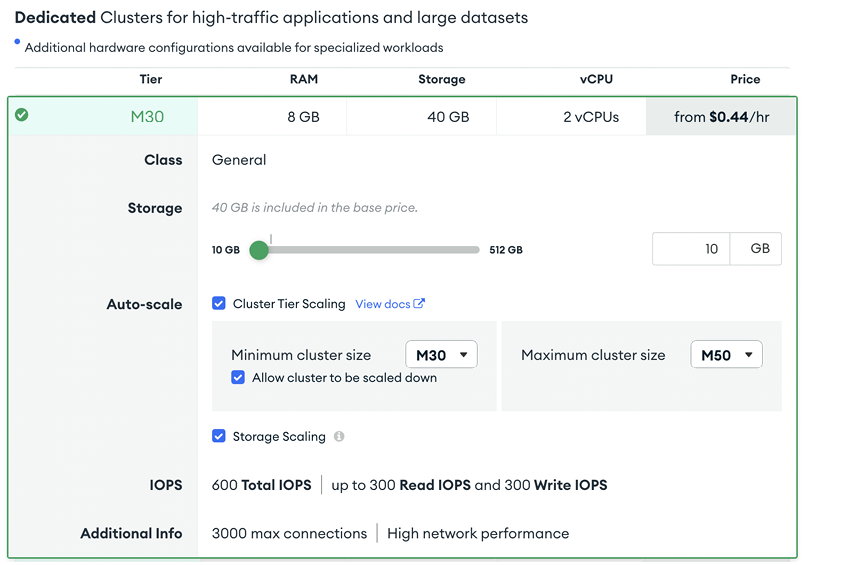
Use the Atlas UI’s Cluster Tier area to inspect and configure cluster-tier and storage autoscaling. section 10.2.3

