The distribution layer aggregates access-switch connections and typically connects the campus LAN to the corporate WAN and internet. In hierarchical Cisco designs, it scales through modular distribution blocks. section 15.2 section 15.2.1
Distribution switches are multilayer switches and usually form the Layer 2–Layer 3 boundary. Trunks connect them to access switches; routed ports connect them to other network areas. Redundant distribution switches commonly provide gateway and routing resilience. section 15.2.1 section 15.5
Use the architecture that matches the number of distribution blocks:
- Use a two-tier, or collapsed-core, design when access and distribution layers are sufficient; the distribution layer combines core and distribution roles. section 15.2.1
- Consider a separate core when a campus has three or more distribution blocks; the core reduces interconnection complexity and cost. section 15.2.2
- Keep core-to-distribution links at Layer 3 and use OSPF so STP does not disable otherwise usable forwarding paths. section 15.2.2
Configuring a redundant distribution SVI
On DSW1, configure VLAN 10 as an SVI, assign 10.0.0.2/24, provide HSRP virtual address 10.0.0.1, raise HSRP priority to 105, and enable OSPF process 1 in area 0. The paired distribution switch can provide redundancy for the gateway. section 15.2.1 section 15.5
Figure 15.4 The distribution layer typically serves as the border between Layer 2 and Layer 3 of the TCP/IP model.
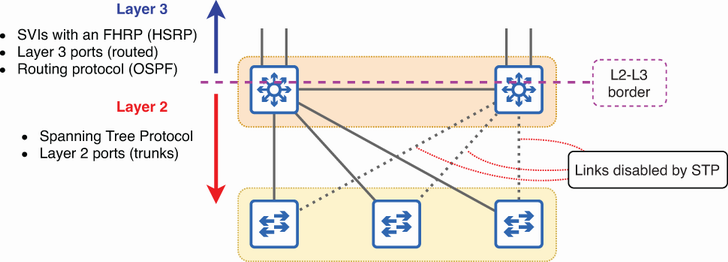
Use the diagram to locate the distribution layer as the boundary between Layer 2 access connections and Layer 3 connections to the rest of the network. section 15.2.1
