A Django app is a Python module that organizes related website code inside a Django project. A project can contain one app or several; each app should have a descriptive purpose and be as self-contained as practical. This keeps a growing site from turning its central URL configuration into a junk drawer. section 2.3 section 2.9
Put website code in apps rather than directly in the project configuration. Views live in an app’s views.py, models can live in models.py, and Django-generated skeleton files provide places for administration, tests, migrations, and app configuration. A project needs at least one app, while larger projects can divide work among multiple apps. section 2.3 section 2.4
Create and activate an app in two separate steps:
- Run python manage.py startapp name from the project directory. The command creates the app directory and stub files, including __init__.py, views.py, models.py, admin.py, tests.py, apps.py, and a migrations package. section 2.4
- Add the app’s name to INSTALLED_APPS in settings.py. Creating the directory alone does not register it with Django. section 2.4 section 2.9
- Add views to the app, then map URLs to those views. A view receives an HttpRequest and returns an HttpResponse. section 2.9
A small home app
A credits page can begin with a home app: run python manage.py startapp home, add 'home' to INSTALLED_APPS, and write the page’s view in home/views.py. The app name is not especially important for a small single-app site, but names should describe an app’s role when a project has several. section 2.4 section 2.3
Apps also provide a boundary for reusable and framework-supplied functionality. Third-party Django apps can be installed, and Django itself includes apps such as auth, contenttypes, sessions, and staticfiles. Management commands are grouped by app when manage.py lists them. section 2.3 section 9.1.1
An app for migration work
A promoters app can isolate a Promoter model while migration behavior is examined. After registering the app, makemigrations promoters creates an initial migration for its model, and migrate applies that migration along with other installed apps’ migrations. section 10.1
Figure 2.3 Anatomy of a Django app
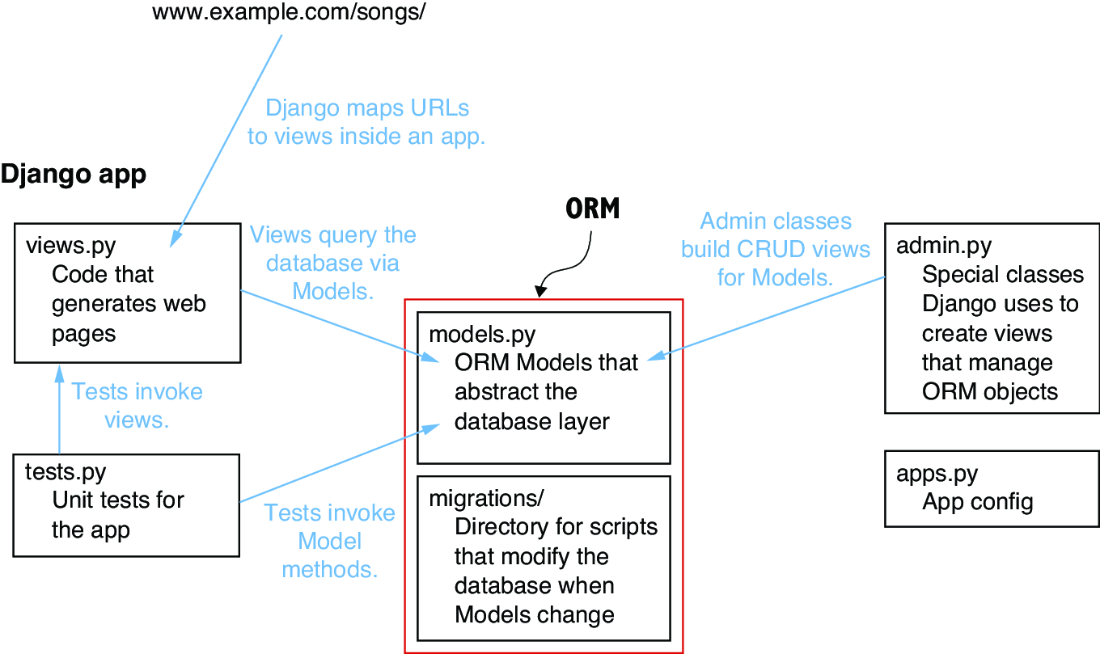
Inspect the generated app layout to see the conventional files created by startapp and the places where views, models, tests, administration, and migrations belong. section 2.4
