A Django project is the site-level structure for a website. It is the framework-managed outline that receives visits through a web server and invokes your code to produce responses. Unlike a library, where your code controls execution order, Django supplies the execution paths; your code plugs into them. section 2.1 section 2.2
Create a separate project for each new site, before adding pages. The project starts as a minimal generated Python program in a directory you name. Use an isolated virtual environment first to avoid package conflicts, install Django, then run `django-admin startproject RiffMates .` to create the project in the current directory. section 2.1 section 2.2
A generated project
A RiffMates project contains `manage.py` alongside a same-named configuration directory. That directory includes `settings.py` for configuration, `urls.py` for URL mappings, and `wsgi.py` as the generated interface between a web server and Django. Run `python manage.py runserver` to start the development server; its output identifies the local URL and any unapplied migrations. section 2.2 section 2.9
Figure 2.1 A web server invokes Django through WSGI, Django calls your code, and then it formats the response for a browser
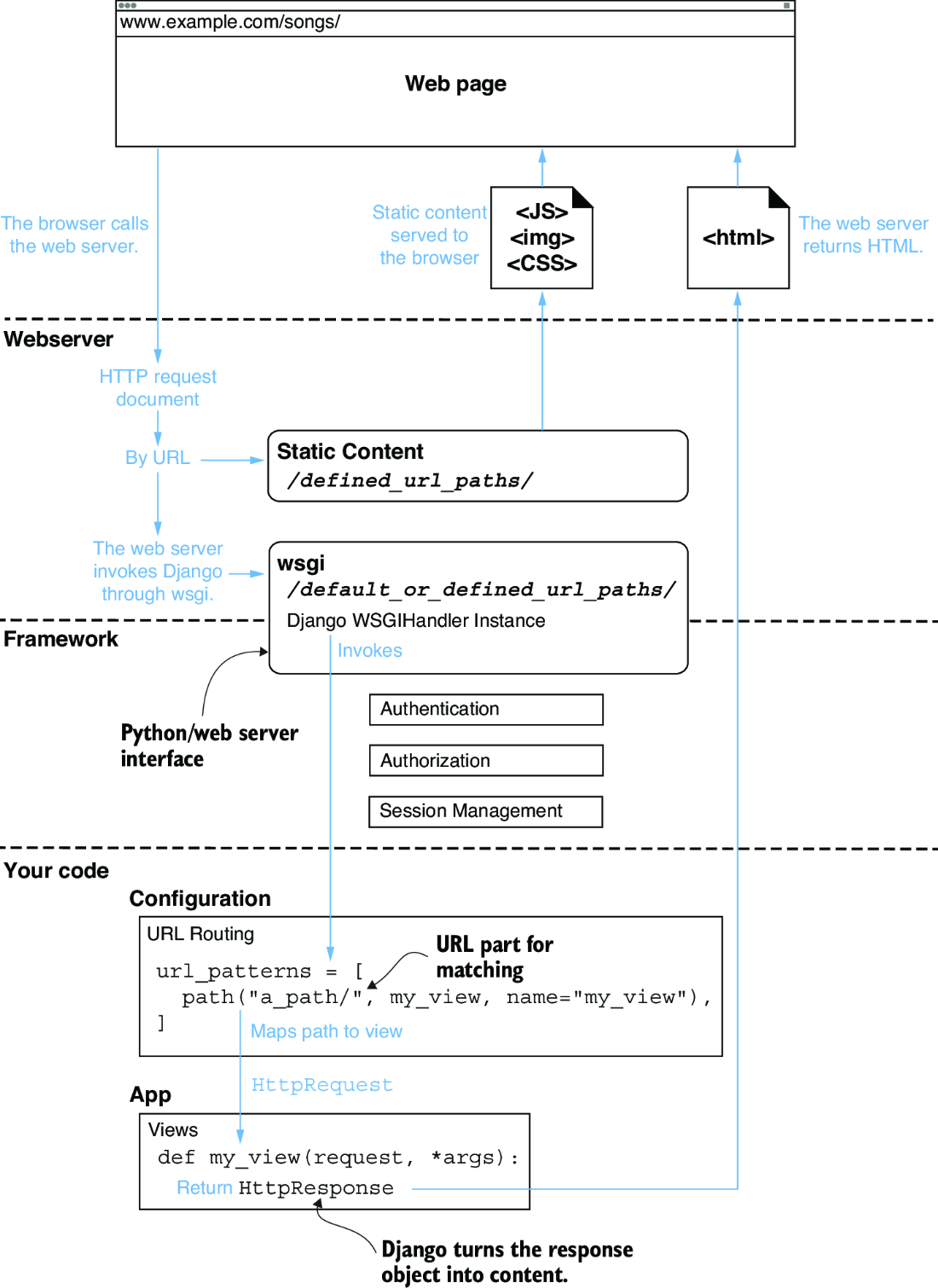
Follow the request path: a web server calls Django through WSGI, Django calls project code, and the response is formatted for the browser. section 2.2
Keep the project as the site container, not the dumping ground for every page. URLs map to views, but putting all views in the project-level `urls.py` soon becomes unwieldy. Put website code into Django apps—Python-module-based units within the project. A project needs at least one app; larger sites can use several self-contained apps, and a web server can host multiple projects when URL routing distinguishes them. section 2.3 section 2.9
The project coordinates the main pieces of a simple page request:
- A browser visits a URL, which the project routes through `urls.py` to a view. section 2.2 section 2.9
- A view in an app accepts an `HttpRequest` and returns an `HttpResponse` containing browser content. section 2.9
- Register each app in `INSTALLED_APPS` within `settings.py` so Django knows it belongs to the project. section 2.9
