A DNS query requests DNS information, commonly translating a domain name such as www.google.com into an IP address. Before sending one, a device checks DNS caches maintained by the operating system and applications. If no matching entry exists, it queries its configured DNS server, receives a response, and stores the mapping temporarily for reuse. section 3.1.2 section 3.3
Follow the operational path and exam-relevant behavior:
- Send queries to the DNS server on port 53; standard queries commonly use UDP, while TCP is also supported for certain responses. section 3.1.2 section 3.3
- Use a recursive query from the client when a definite IP address or an error is required; the DNS server performs the resolution. section 3.2.2 section 3.3
- Learn the DNS server address through DHCP or manual configuration, then cache successful name-to-address mappings. section 3.1.2
On Cisco IOS, enable client lookups with ip domain lookup, enabled by default, and configure resolvers with ip name-server ip-address. Specify up to six servers; IOS tries another when the first fails. To provide DNS service locally, configure ip dns server and upstream resolvers with ip name-server. The router then answers client queries from its cache or forwards them upstream. section 3.2.1 section 3.2.2
Verify Cisco IOS name resolution
Before configuring a resolver, ping google.com fails with an unrecognized host message. After configuring `ip name-server 8.8.8.8`, the output shows `domain server (8.8.8.8) [OK]`, resolves the name to an IP address, and completes the ping successfully. Configure `ntp server time1.google.com` to demonstrate that IOS can resolve a service name for NTP. section 3.2.1
Figure 3.2 DNS name resolution. (1) PC1 sends a DNS query to its DNS server (8.8.8.8) asking for the IP address of www.google.com. (2) The DNS server replies, informing PC1 of the IP address. (3) PC1 communicates with the web server via HTTPS (for example, to retrieve a web page).
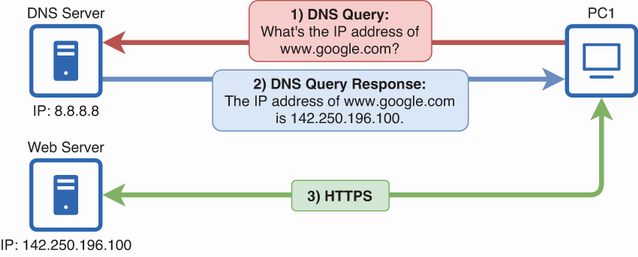
Trace the complete exchange: PC1 queries its DNS server, receives the address for www.google.com, and then connects to the web server using HTTPS. section 3.1.2
