A DNS server resolves domain-name queries into network records, commonly returning an IP address. A device checks its DNS cache first; without a matching entry, it sends a query to its configured DNS server on port 53. DNS commonly uses UDP and can also use TCP. section 3.1.2 section 3.3
Cisco IOS devices can operate as DNS clients, servers, or both. As a client, the router uses ip domain lookup and ip name-server to resolve names; lookup is enabled by default, and up to six name servers can be configured. As a server, ip dns server lets the router answer hosts’ queries, forward unresolved queries to configured name servers, and cache responses. section 3.2.1 section 3.2.2
Useful Cisco IOS DNS configuration and verification commands include:
- ip dns server enables the router to respond to client DNS queries. section 3.2.2
- ip name-server 8.8.8.8 configures an upstream DNS server; multiple servers provide alternatives when one fails. section 3.2.1
- ip domain name jeremysitlab.com sets the default domain appended to short hostnames. section 3.2.2
- ip host pc2.jeremysitlab.com 10.0.0.12 creates a manual hostname-to-address mapping. section 3.2.2
- show hosts displays dynamically learned and manually configured mappings, including cached records. section 3.2.2 section 3.3
Router-based name resolution
Before configuration, R1 cannot resolve google.com and reports an unavailable domain server. After ip name-server 8.8.8.8 is configured, R1 resolves the name and successfully completes an ICMP ping. With ip dns server enabled, a LAN host can query R1; R1 forwards unresolved queries to 8.8.8.8, caches the response, and answers later queries locally. Manual mappings similarly allow PC1 to ping pc2 by hostname.
Figure 3.7 R1 is a DNS server for hosts in its connected LAN. (1) PC1 queries R1 to resolve the domain name youtube.com. (2) R1 can’t resolve the name itself, so R1 queries 8.8.8.8. (3) 8.8.8.8 responds to R1, informing it of youtube.com’s IP address, and then (4) R1 responds to PC1. In step 5, PC1 communicates with youtube.com via HTTPS.
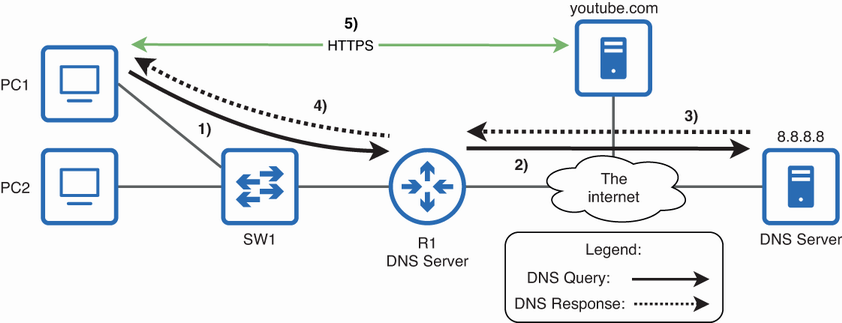
Trace the recursive query path from a LAN client to the Cisco IOS DNS server, upstream resolver, cached response, and final HTTPS connection. section 3.2.2

