The Document Object Model (DOM) is a tree representing a page’s content. The browser builds it by parsing HTML, with each HTML element represented as a node. Nodes have parent-child relationships; nodes with the same parent are siblings. section 4.2 section 4.2.1
HTML is a blueprint for the initial DOM, not the DOM itself. The browser may correct invalid markup while constructing the tree. Once a script runs, JavaScript can read and modify the DOM; by default, encountering a script pauses HTML parsing until the script executes. section 4.2 section 4.2.1
When the browser repairs markup
If a paragraph is placed inside the head element, the browser can move it into the body in the DOM it constructs. The resulting tree may therefore differ from the HTML blueprint. section 4.2.1
Figure 4.2 The page-building phase starts when the browser receives the code of the page. The process of parsing HTML to build the DOM is interrupted whenever JavaScript code runs.
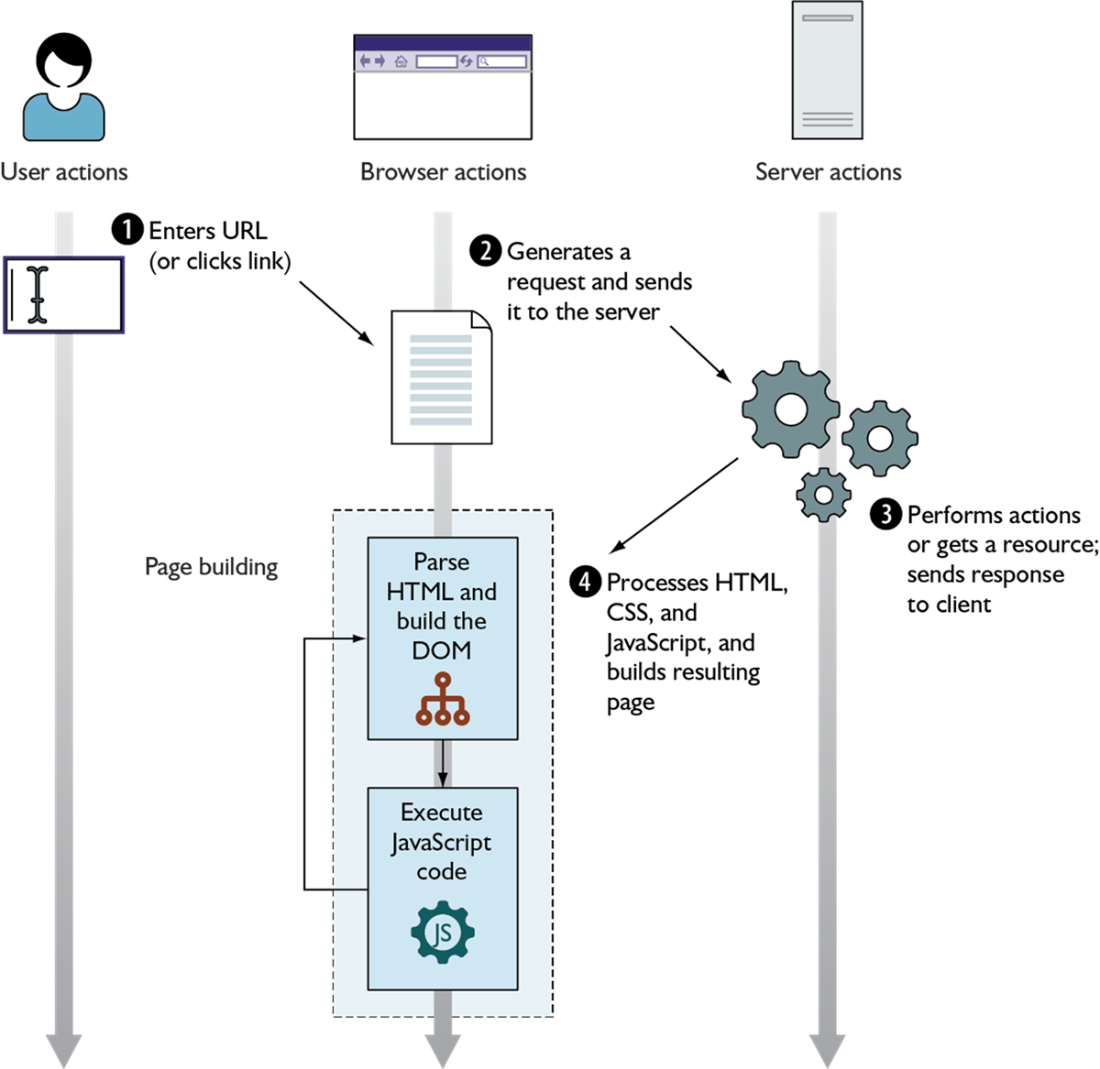
Trace how HTML parsing builds the DOM and how script execution interrupts that process. section 4.2