A dynamic EtherChannel combines multiple physical switch links into one logical link by negotiating with the neighboring switch. The switches compare configuration parameters before forming the channel. This avoids incorrectly bundling mismatched links, which can create LAN loops. Unlike static EtherChannel, dynamic configuration uses a negotiation protocol. section 16.2 section 16.2.1
Choose the negotiation protocol and compatible modes:
- PAgP is Cisco-proprietary. Use desirable to actively negotiate or auto to wait for a desirable neighbor. desirable + desirable and desirable + auto form a channel; auto + auto does not. section 16.2.1
- LACP is standardized by IEEE 802.3ad and supports multivendor links. Use active to negotiate or passive to wait; at least one side must be active. section 16.2.1 section 16.5
- Prefer LACP when the neighbor is not a Cisco switch. PAgP can combine up to eight links; LACP can support up to sixteen, with up to eight active simultaneously. section 16.2.1 section 16.5
Two-switch LACP trunk
On SW1, configure the member interfaces with channel-group 1 mode active; on SW2, use channel-group 1 mode passive. Enter interface po1 on both switches and apply switchport mode trunk. The resulting Po1 represents the physical links as one logical trunk. Verify with show etherchannel summary; bundled ports display P and the channel should show LACP. For PAgP, replace the modes with desirable on one side and auto on the other.
Figure 16.5 An EtherChannel is formed between SW1 and SW2 using PAgP. SW1’s G0/0 and G0/1 ports are configured in PAgP desirable mode, and SW2’s G0/0 and G0/1 ports are configured in PAgP auto mode. switchport mode trunk is applied to each switch’s port channel interface to make the EtherChannel a trunk.
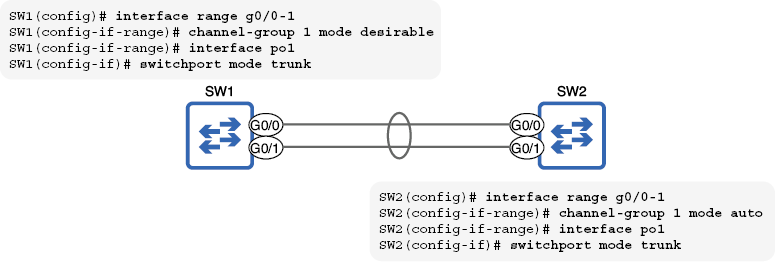
Use the topology figure to compare PAgP desirable and auto settings, member links, and trunk configuration on the logical port-channel interface. section 16.2.1
