A static EtherChannel combines specified switch ports into one logical link without negotiating with the neighboring device. Both sides must use the single static mode, on. section 16.2 section 16.2.2
Configure and evaluate it with these points:
- Assign member ports with channel-group group-number mode on; configure both ends in on mode. section 16.5 section 16.2.2
- Match member-port settings, including speed, duplex, access or trunk mode, allowed VLANs, native VLAN, and access VLAN. section 16.5
- Prefer PAgP or LACP when possible because static formation does not verify the neighbor and can create Layer 2 loops. section 16.2.2
- Use static EtherChannel when the connected device requires it, such as a wireless LAN controller. section 16.2.2
Figure 16.8 A static EtherChannel is formed between SW1 and SW2. Both switches’ ports are configured in on mode. switchport mode trunk is applied to each switch’s port channel interface to make the EtherChannel a trunk.
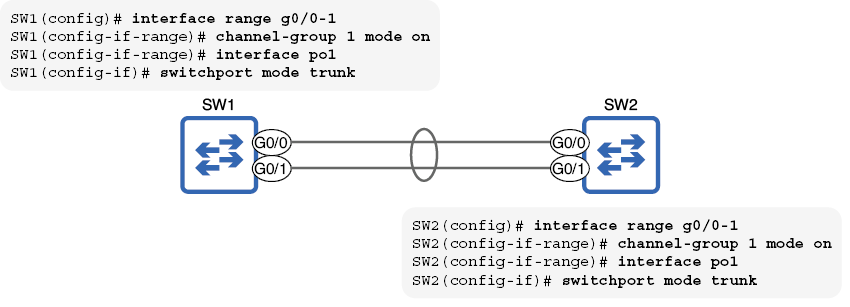
Use the topology figure to see both switches’ ports configured in on mode and the port channel made a trunk. section 16.2.2
