A wireless LAN controller (WLC) centralizes control of multiple access points, making larger wireless LANs easier to deploy, manage, secure, and troubleshoot. An AP managed by a WLC is a lightweight AP (LWAP). section 19.2 section 19.2.2
WLCs use split-MAC architecture. LWAPs perform real-time wireless work—transmitting and receiving RF signals, encrypting 802.11 frames, sending beacons, and answering probe requests—while the WLC performs non-real-time management. section 19.2.2 section 19.3
The WLC handles the centralized functions that simplify wireless operations:
- Sets LWAP channels and transmit power through RF management. section 19.2.2
- Handles client authentication and association. section 19.2.2
- Enforces quality-of-service and security policies. section 19.2.2
- Translates SSIDs into VLANs, allowing LWAPs to use access ports in the management VLAN instead of trunk ports. section 19.2.2 section 19.3
CAPWAP establishes two tunnels between each LWAP and the WLC. The data tunnel carries wireless client traffic, while the control tunnel carries LWAP-to-WLC communications. The control tunnel is encrypted by default with DTLS; the data tunnel is not. section 19.3 section 19.2.2
Basic WLC topology and setup
A simple deployment uses one WLC, one LWAP, and a switch providing the default gateway, DHCP, and NTP services. The WLC management interface can use VLAN 10 with address 192.168.1.100/24, gateway and DHCP server 192.168.1.1, and LAG enabled. The Cisco Wizard Configuration Tool collects these values before saving the configuration and resetting the controller. WLAN configuration then proceeds through the WLC GUI, where WLANs such as Internal and Guest can map to wired VLANs. section 21.1 section 21.1.2
Figure 19.6 Two LWAPs managed by a WLC. The WLC handles management functions, and the LWAPs handle real-time functions.
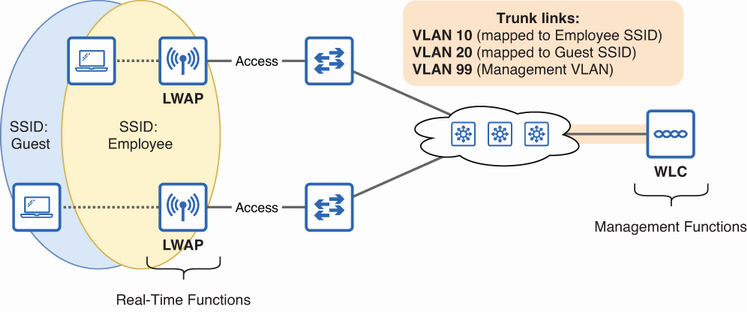
Visualizes split-MAC operation by separating centralized WLC management from real-time LWAP functions. section 19.2.2
Deployment choices include unified hardware, cloud WLC virtual machines, embedded controllers integrated into switches, and Mobility Express controllers integrated into APs. FlexConnect can allow an LWAP to switch traffic locally between SSIDs and VLANs. section 19.2.2
